Book Aramex South Africa shipments and print labels when you validate
This Aramex Odoo integration sends your order details to Aramex South Africa and brings back the rate, the tracking number and the label. Your team quotes shipping on the sale order, packs the goods, then validates the delivery to produce the label.
- Odoo 17.0 – 20.0
- Community & Enterprise
- Odoo.sh · On-premise
-
Not for
Odoo Online
Top seller on the Odoo Apps Store
- sales on the Odoo Apps Store
- 3,000+
- apps published
- 100+
- countries running them
- 100+
Aramex shipping work before and after this connector
Without the connector by hand
-
Retype customer addresses into a courier portal for every parcel.
-
Quote shipping from a rate sheet and hope the invoice matches.
-
Copy tracking numbers back into Odoo one order at a time.
-
Download labels in a separate browser tab, then print them.
-
Phone the courier when a customer asks where the parcel is.
With the connector automatic
-
Validating the delivery order sends the shipment details to Aramex.
-
The Aramex delivery method prices the sale order and the website checkout.
-
Aramex returns the tracking number onto the delivery order.
-
The label comes back on the delivery order, ready for your team to print.
-
Check the shipment's current status from the delivery order's tracking.
Shipment details, labels and tracking between Odoo and Aramex South Africa
Every object the connector handles, which way it travels and what triggers it.
| Data | Direction | What happens & when |
|---|---|---|
| Shipment and address details |

 Odoo to Aramex
|
You validate the delivery order in Odoo. |
| Shipping rate |
Aramex to Odoo
|
The Aramex delivery method is added to a quotation or website order. |
| Tracking number |
Aramex to Odoo
|
Returned when the delivery order is validated. |
| Shipping label |
Aramex to Odoo
|
Generated on validation and attached to the delivery order. |
| Shipment status |
Aramex to Odoo
|
You check tracking from the delivery order. |
Aramex Odoo Shipping Connector features
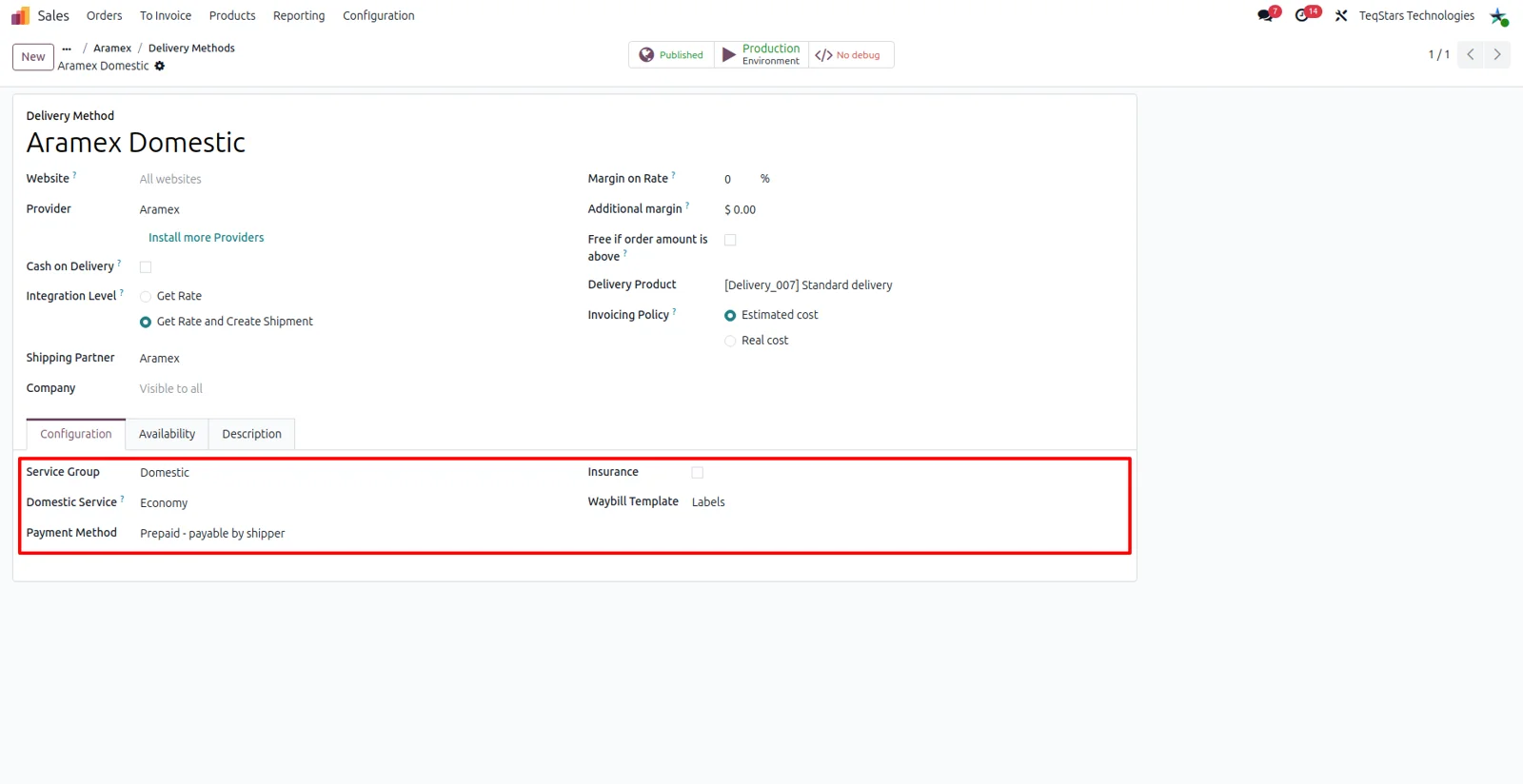
Set up domestic and international methods
Odoo prices each parcel with the right Aramex service, whether it stays inside South Africa or crosses a border. You create a delivery method per service, choose the Aramex provider, and link it to the account you ship under. Keeping local and global methods apart lets your team see at a glance which option belongs on an order.
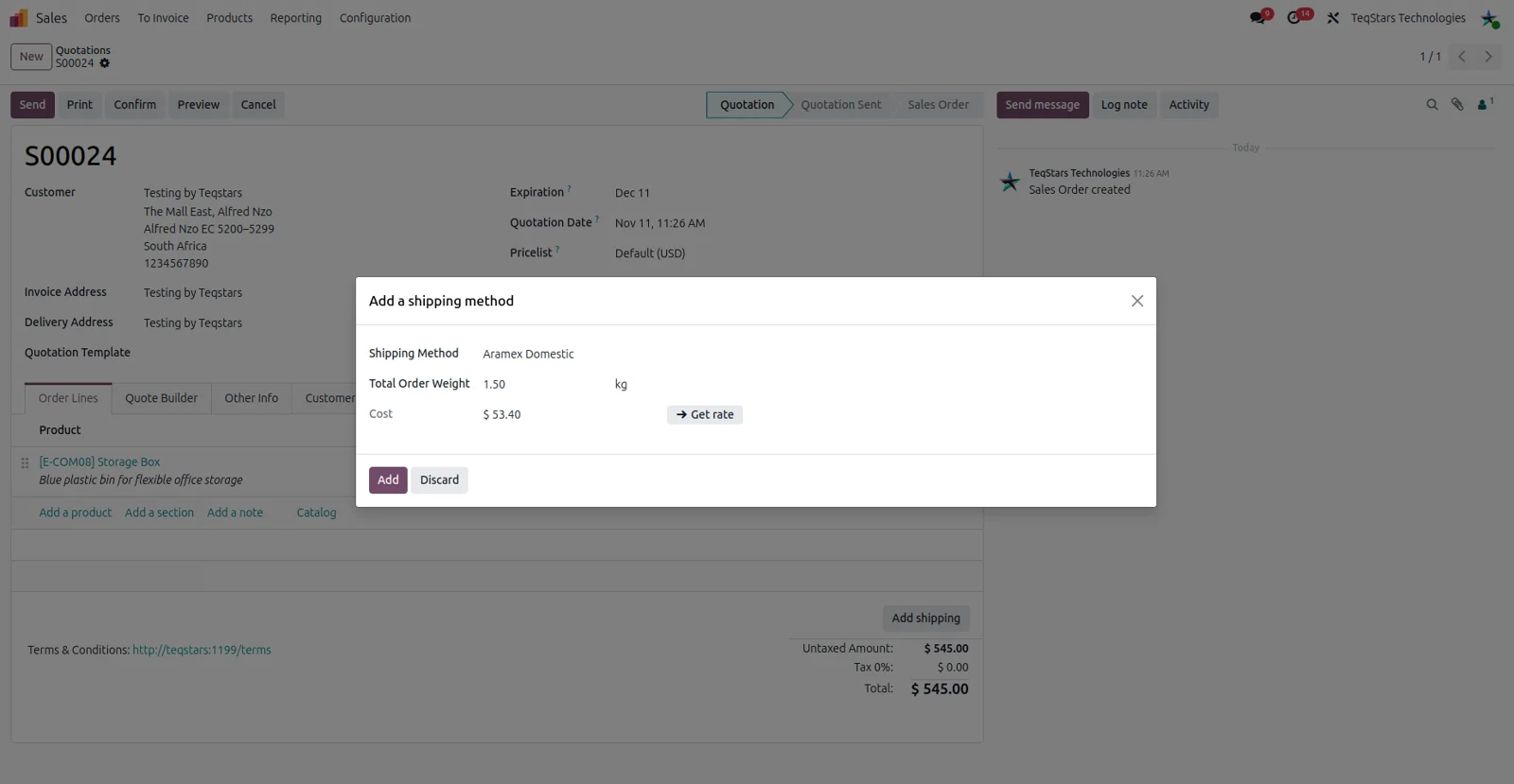
Quote Aramex shipping on orders and your website
Customers see an Aramex shipping cost before they commit. Add the delivery method to a quotation and Odoo asks Aramex for a price based on the delivery address and the goods on the order. The same method shows up as a shipping choice at website checkout, so online buyers pick Aramex and read the cost there.
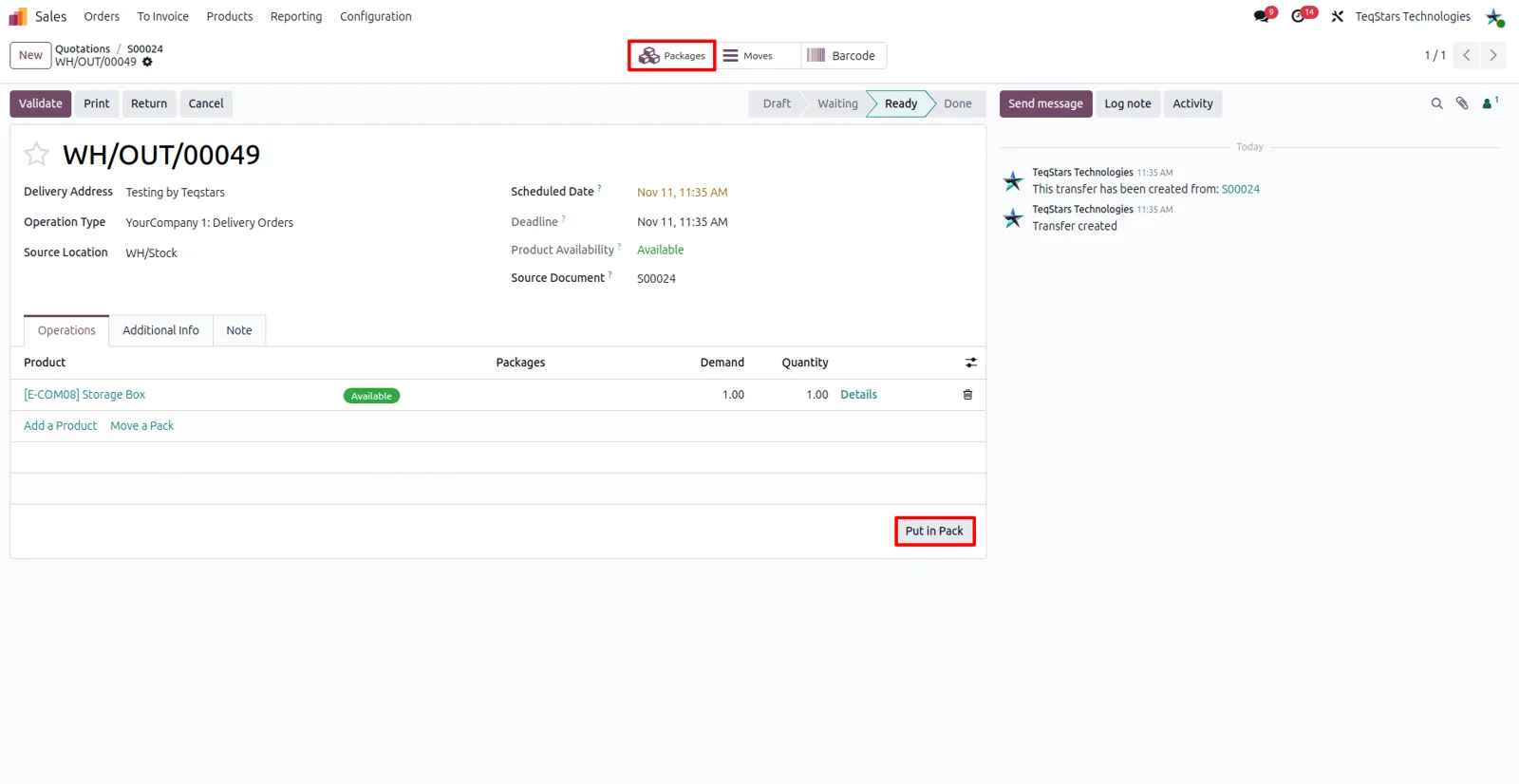
Pack an order into several boxes
Ship one order in multiple boxes and Aramex still receives the right details. On the delivery order your team uses "Put in Pack" to group products into packages before validating, so each package carries its own contents. You can also add insurance to the shipment when the goods need cover while they are in transit.
Get tracking numbers on the delivery order
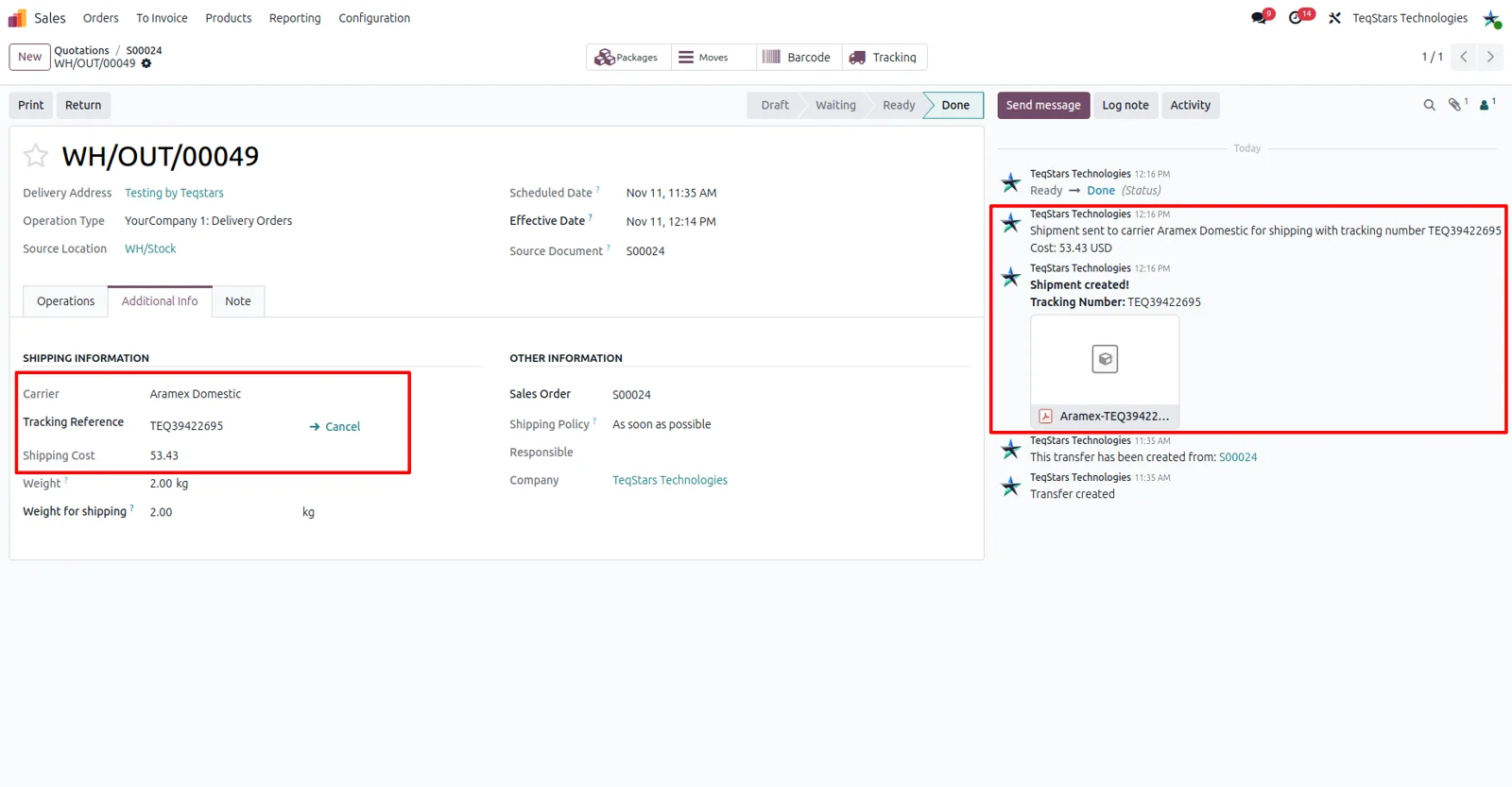
Validating the delivery order books the shipment with Aramex, and the tracking number comes back onto that same order. Nobody copies reference numbers between two systems or keeps a spreadsheet of waybills. Because the booking happens in the warehouse step your team already does, picking, packing and dispatch stay a single flow.
Print the Aramex shipping label
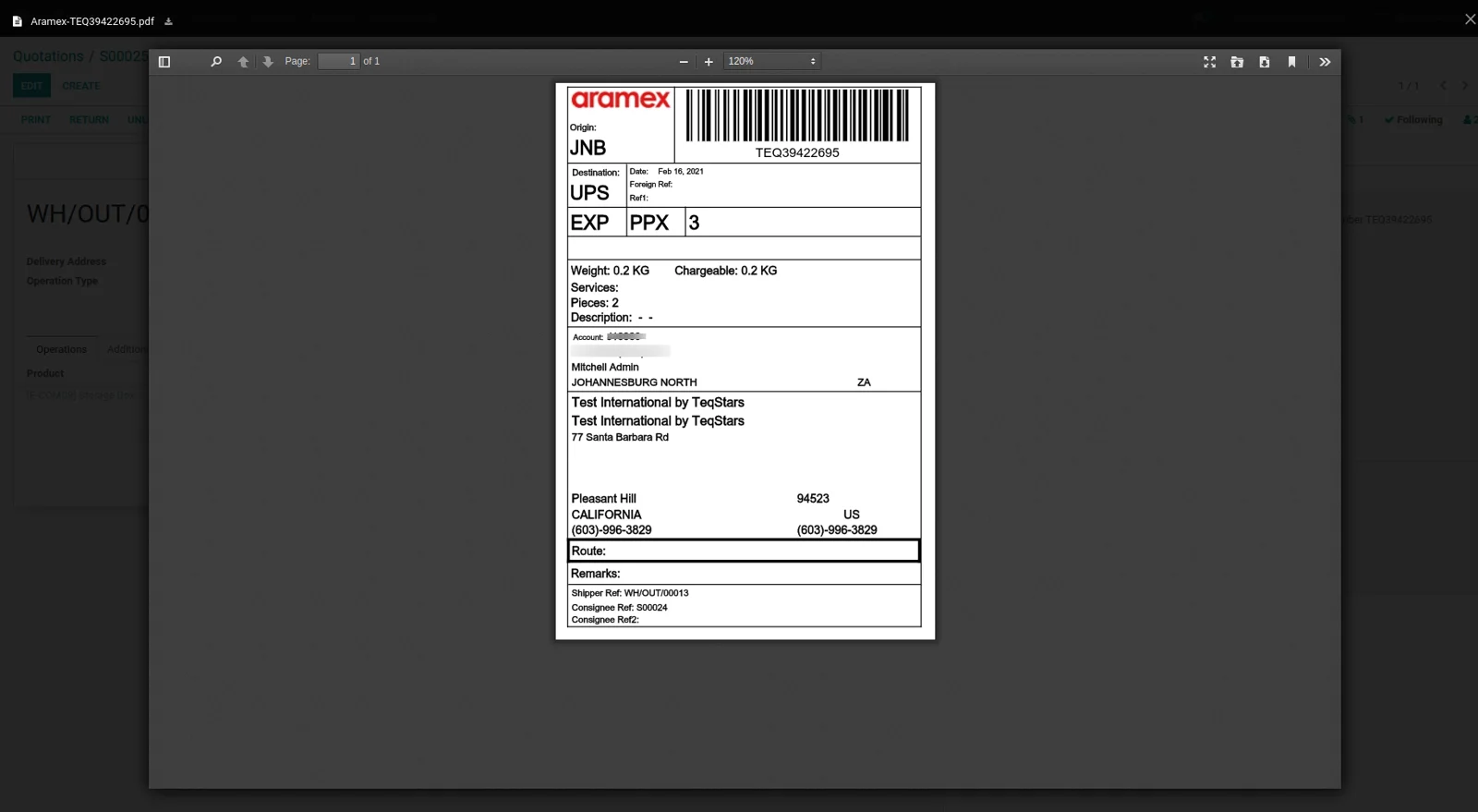
The label arrives as a document on the delivery order, ready to print and tape to the box. It carries the barcode and address information Aramex needs to move the parcel through its network. Since it is produced when the delivery is validated, the warehouse prints at the packing bench rather than signing in to a courier portal.
Check where a shipment is right now
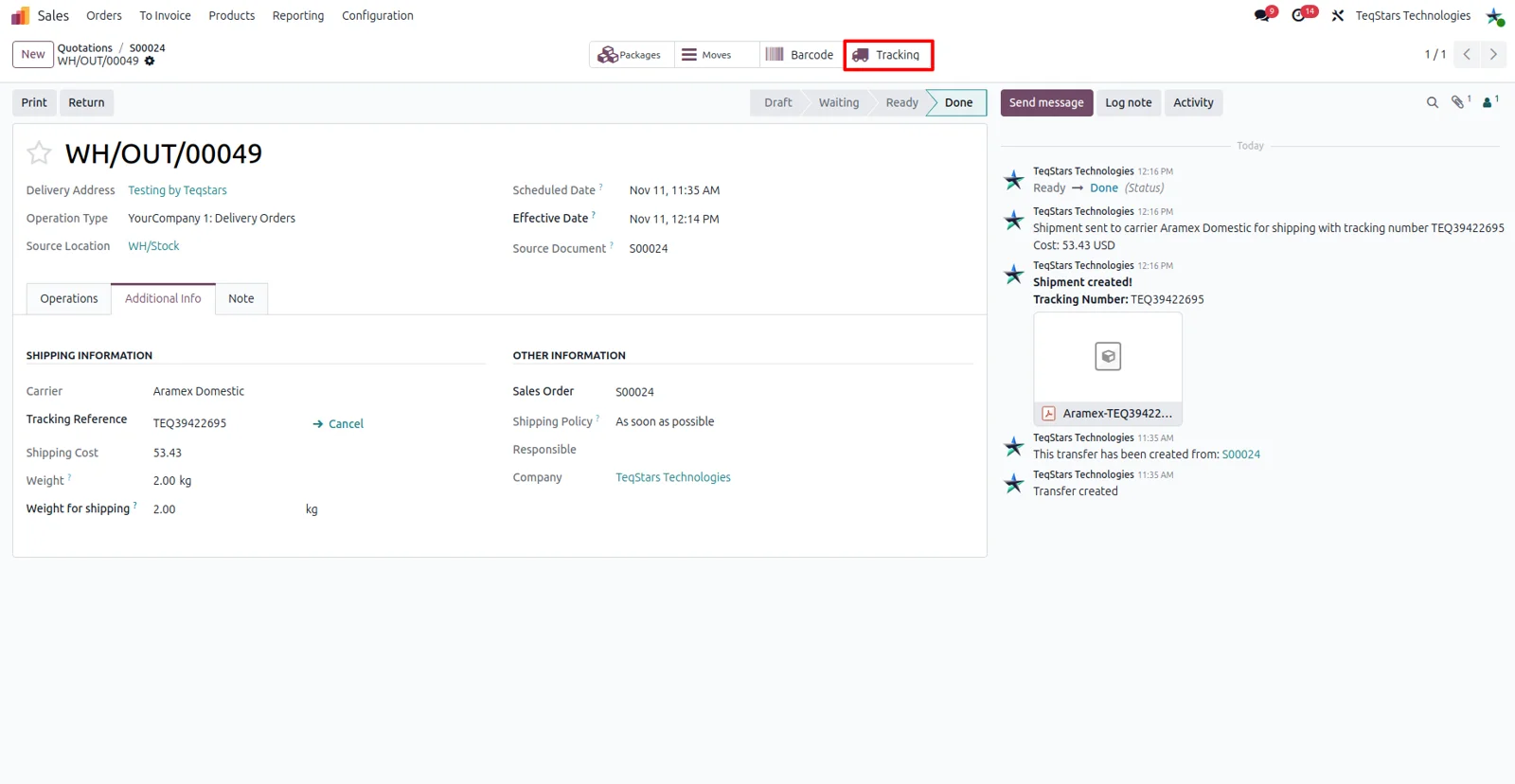
Answer "where is my parcel" without calling the courier. The delivery order holds the Aramex tracking reference, and the connector shows the shipment's current status and location in real time. Sales and support staff check progress on the record they already have open, and the customer can follow the same tracking number on their side.
Supported Odoo versions
| Odoo version | Editions | Hosting | Price | Latest release | |
|---|---|---|---|---|---|
| 20.0 | Community & Enterprise | Odoo.sh · On-premise | €208.99 | No release notes | Buy |
| 19.0 | Community & Enterprise | Odoo.sh · On-premise | €208.99 | No release notes | Buy |
| 18.0 | Community & Enterprise | Odoo.sh · On-premise | €208.99 | No release notes | Buy |
| 17.0 | Community & Enterprise | Odoo.sh · On-premise | €208.99 | No release notes | Buy |
Support for Aramex Connector
The developers who build the app answer your tickets.
- Free app support from purchase
- 60 days
- First response in working hours, typical
- 4–6 hours
- Support hours, 10:00–18:00 IST
- Mon–Fri
How to connect Aramex to Odoo
-
Step 1
Install and add your account
Install the connector on Odoo 17.0, 18.0, 19.0 or 20.0, then enter the credentials of your Aramex South Africa account. Ship under several accounts? Add each one to the database.
-
Step 2
Create the delivery methods
Add one shipping method per Aramex service you sell, and point each at the account it belongs to. Separate entries for local and cross-border services keep the choice obvious for your sales team.
-
Step 3
Offer Aramex to buyers
Put the method on quotations so Odoo asks Aramex for a price, and publish it on your website so online shoppers choose it during checkout and see the cost there.
-
Step 4
Pack and validate to ship
In the warehouse, group goods with "Put in Pack" when an order needs several boxes, add insurance if it applies, then validate. The tracking number and the label come back on the order.
Questions before you buy
Not answered here? Talk to the team.