DPD Germany labels and tracking numbers on every validated delivery
Validate a picking and this DPD Germany Odoo integration creates the shipping label and stores the tracking number on the delivery order. Shipping charges come from the fixed price or the pricing rules you set. You can connect more than one myDPD Business Customers account.
- Odoo 17.0 – 20.0
- Community & Enterprise
- Odoo.sh · On-premise
-
Not for
Odoo Online
Top seller on the Odoo Apps Store
- sales on the Odoo Apps Store
- 3,000+
- apps published
- 100+
- countries running them
- 100+
Shipping work before and after the DPD Germany connector
Without the connector by hand
-
Retype order addresses into the carrier portal for every parcel
-
Print labels in the portal, then match each one to its picking
-
Copy tracking numbers into Odoo and read them back to customers
-
Look up postage in a rate sheet before quoting shipping
With the connector automatic
-
Validating the delivery order sends the shipment details to DPD Germany
-
The label is attached to the delivery order, ready for you to print
-
The tracking number is saved on the same delivery order
-
The DPD delivery method returns your fixed price or rule-based amount on the quote
Shipments, labels and tracking between Odoo and DPD Germany
Every object the connector handles, which way it travels and what triggers it.
| Data | Direction | What happens & when |
|---|---|---|
| Shipment request |

 Odoo to DPD Germany
|
You validate the delivery order |
| Package details |
Odoo to DPD Germany
|
You run Put in Pack before validating, for multi-parcel orders |
| Shipping label |
DPD Germany to Odoo
|
Returned with the shipment and attached to the delivery order |
| Tracking number |
DPD Germany to Odoo
|
Stored on the delivery order when the shipment is created |
DPD Germany Connector features
Set up the DPD Germany delivery method
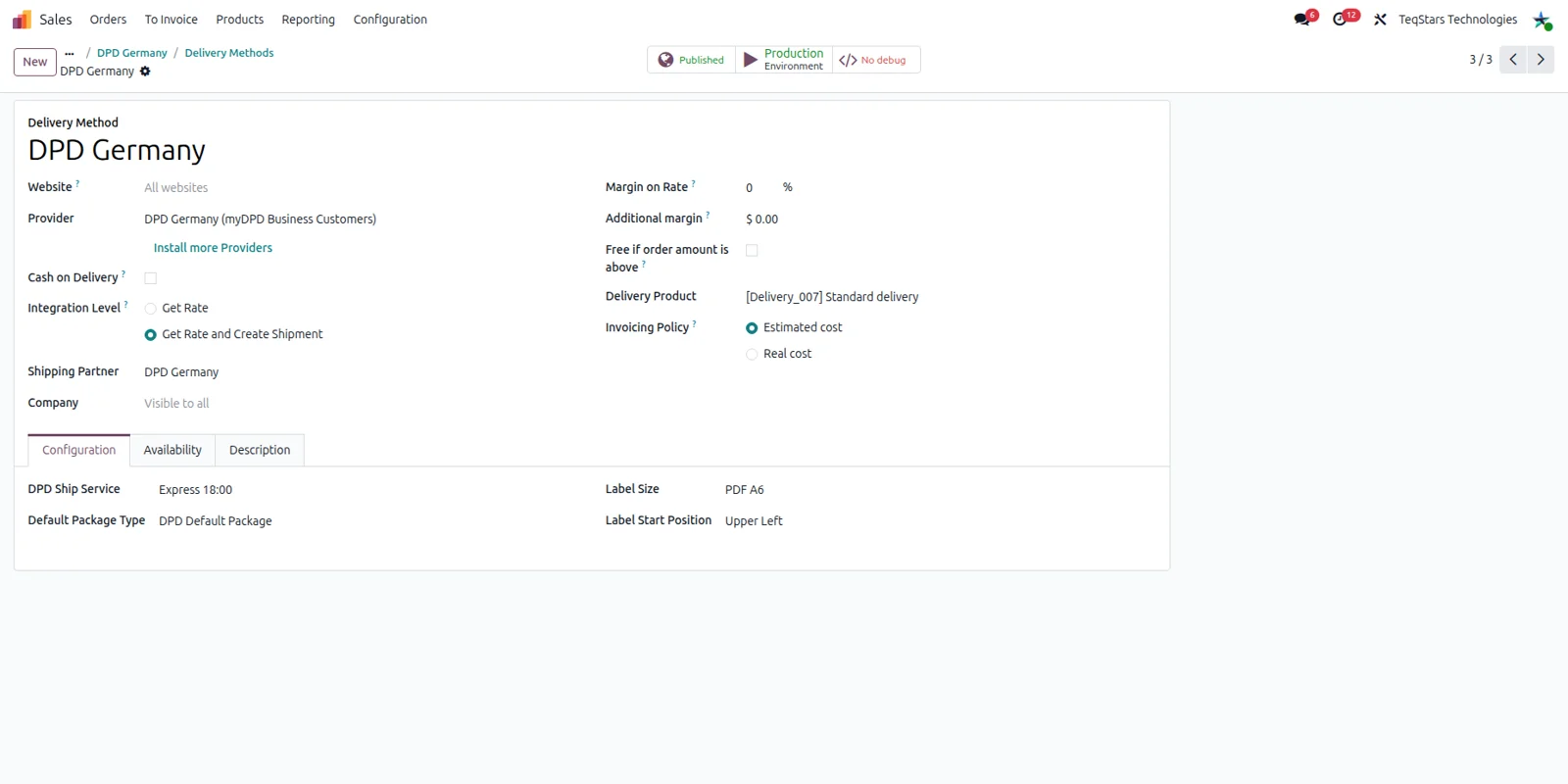
One delivery method record holds how your DPD Germany parcels are handled, so every shipment that uses it follows the same settings. You pick DPD as the provider and attach the myDPD Business Customers account the shipments go out under. Teams that ship both at home and abroad often keep two methods, because the charges differ.
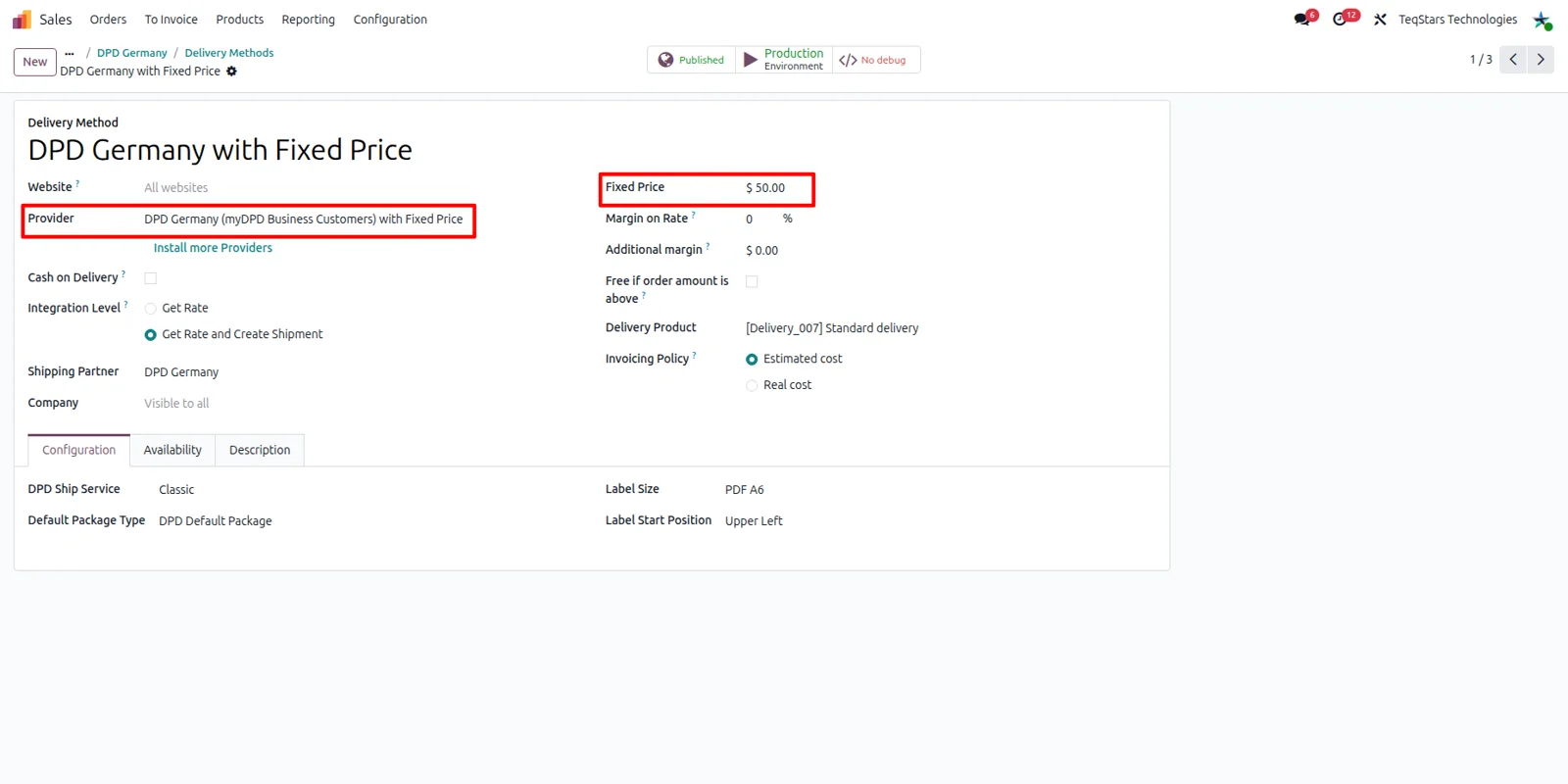
Charge one flat DPD shipping price
Quote a single shipping amount for DPD Germany parcels and be done with it. On the delivery method you select the fixed price option and type the figure your customers pay. Odoo uses that amount on the order, so the charge never depends on a live price lookup. It fits a single domestic rate or a promotional shipping offer.
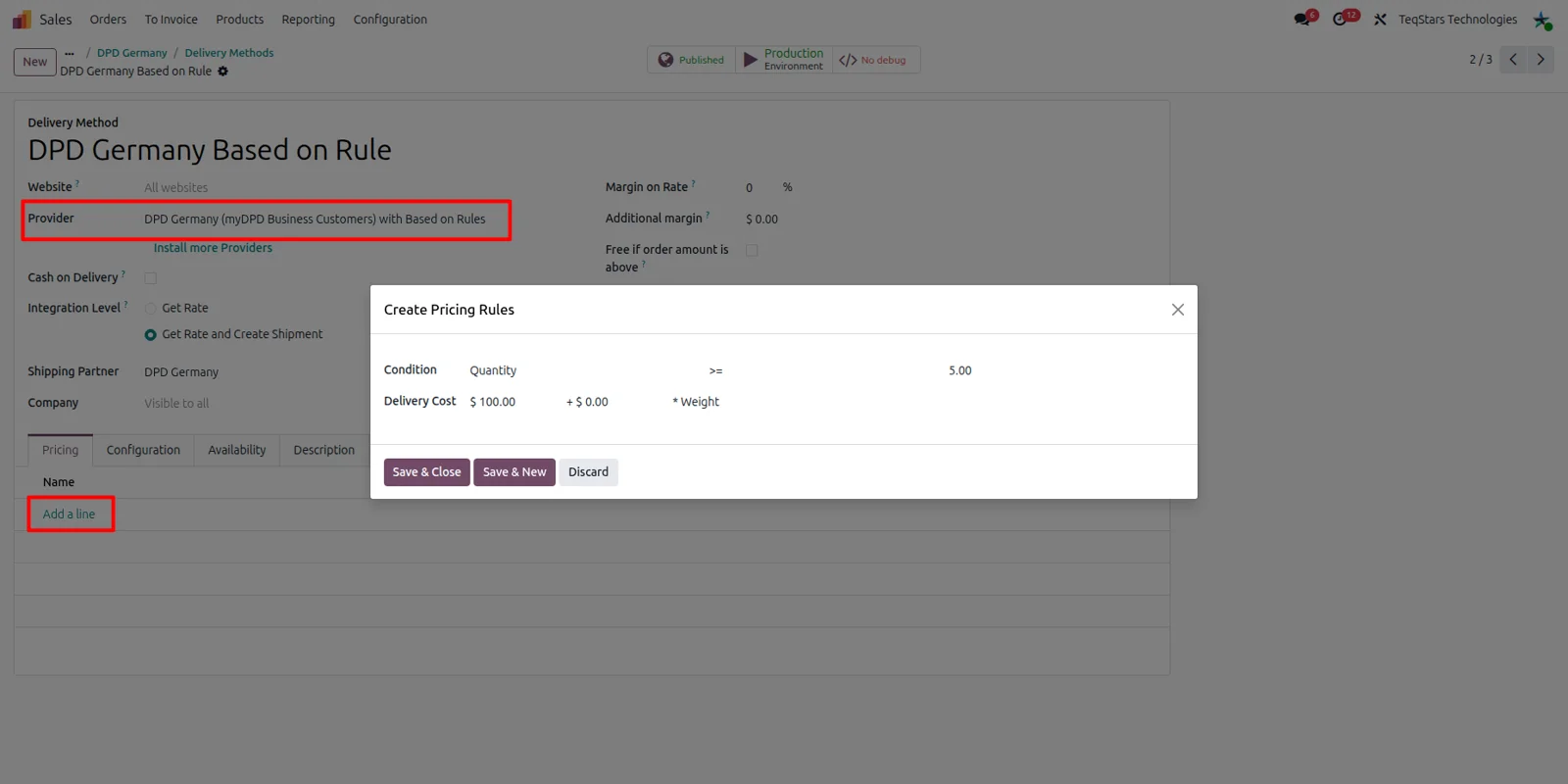
Build pricing rules for parcel rates
Charge different amounts depending on what is in the shipment. The pricing rules on the delivery method take one line per condition, such as weight, volume, price or quantity, each with the delivery cost you want. Odoo reads the line that matches when the DPD Germany rate is requested on a quote. The numbers stay yours, since no live DPD price is fetched.
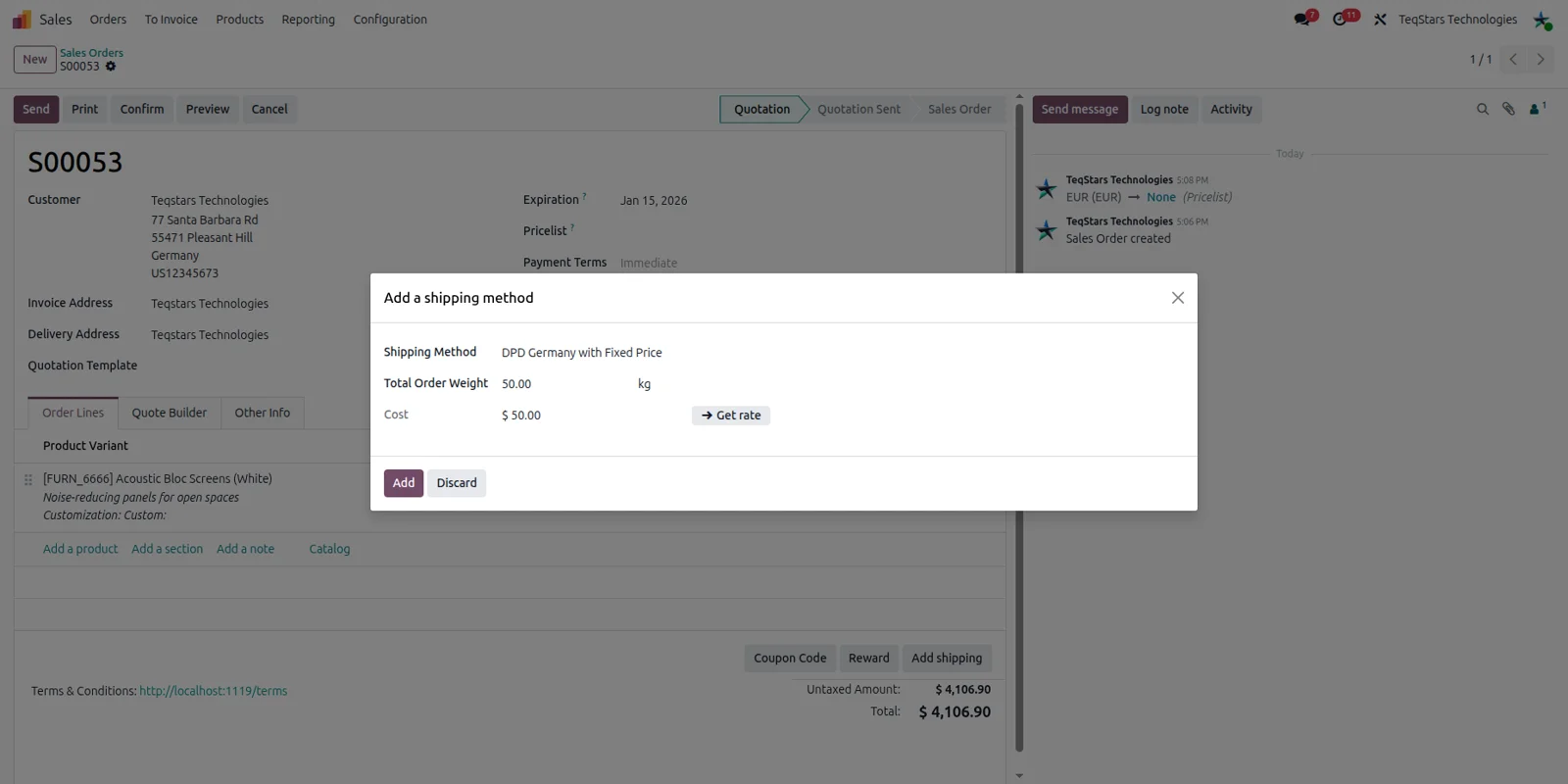
Add shipping cost to a quotation
Your salespeople see the DPD Germany charge before they confirm an order. They choose the DPD delivery method on the quotation and Odoo adds the configured amount as a delivery line. The customer total then includes shipping, so nobody has to remember postage later. Picking the rule-based method instead recalculates that same line from your rules.
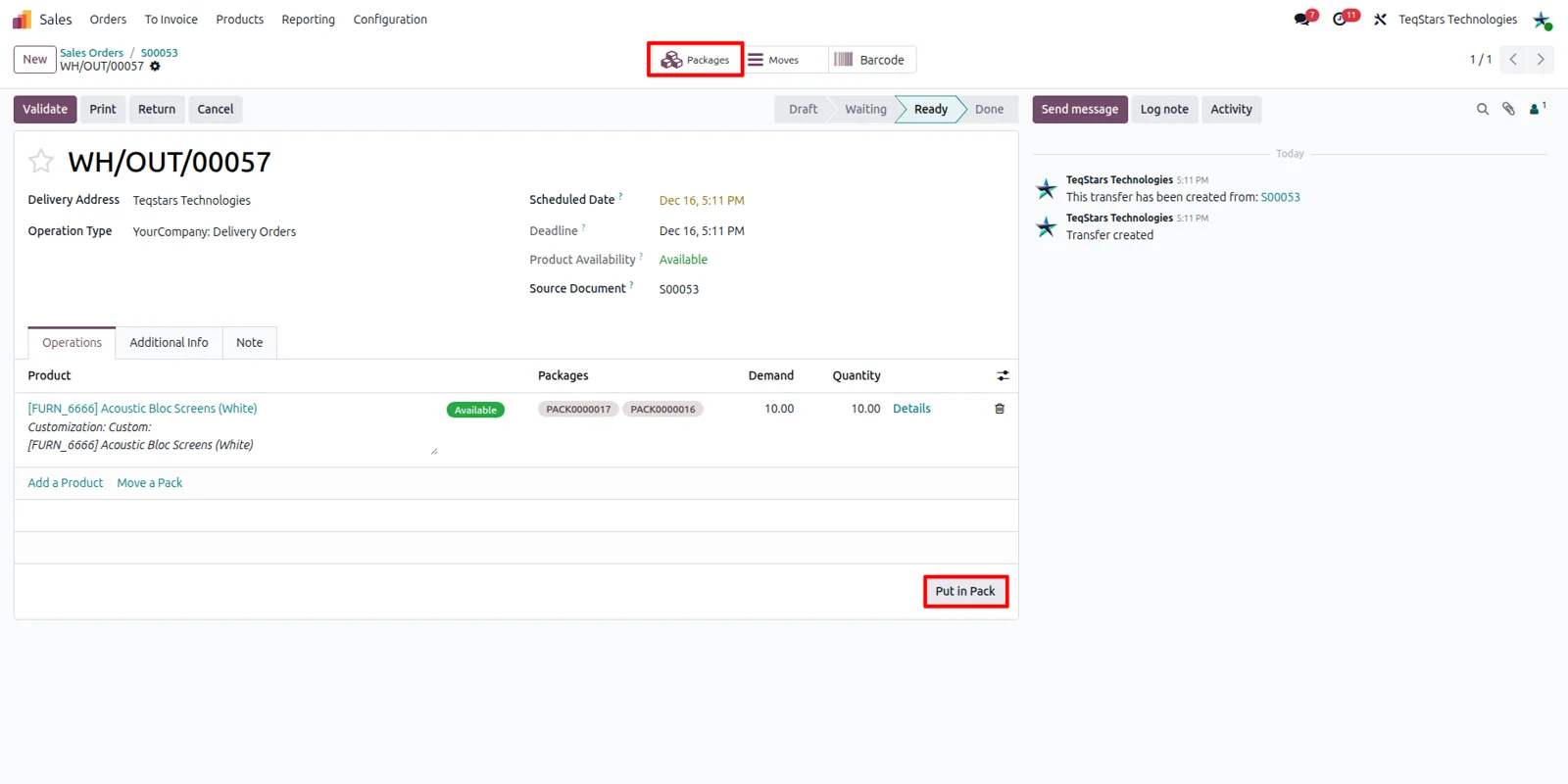
Split an order into several parcels
Send one order as more than one box and keep a record of what went where. On the delivery order you use the "Put in Pack" operation to group the goods into packages before validating. The connector then asks DPD Germany for a shipment covering the packages you created instead of a single parcel. Each package carries its own contents.
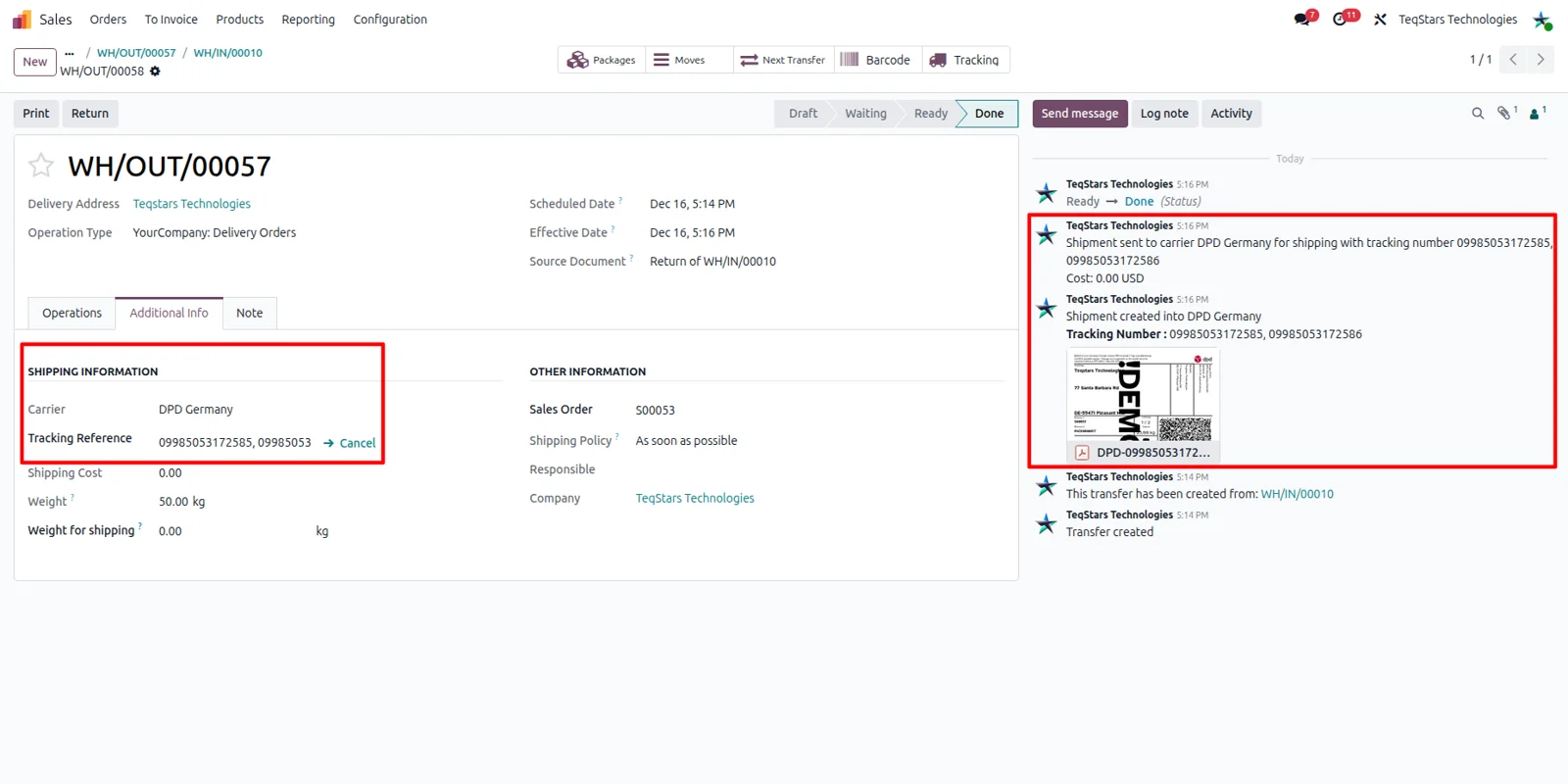
Print labels and follow the parcel
Validating the delivery order creates the DPD Germany shipping label and saves the tracking number on the same document. The label is attached to the delivery, so your packer can print it and get the box on the van. The tracking reference gives your team visibility of the parcel's status and where it currently is, which answers most customer calls.
Supported Odoo versions
| Odoo version | Editions | Hosting | Price | Latest release | |
|---|---|---|---|---|---|
| 20.0 | Community & Enterprise | Odoo.sh · On-premise | €109.98 | No release notes | Buy |
| 19.0 | Community & Enterprise | Odoo.sh · On-premise | €109.98 | No release notes | Buy |
| 18.0 | Community & Enterprise | Odoo.sh · On-premise | €109.98 | No release notes | Buy |
| 17.0 | Community & Enterprise | Odoo.sh · On-premise | €109.98 | No release notes | Buy |
Support for DPD Germany (myDPD Business Customers) Connector
The developers who build the app answer your tickets.
- Free app support from purchase
- 60 days
- First response in working hours, typical
- 4–6 hours
- Support hours, 10:00–18:00 IST
- Mon–Fri
How to connect DPD Germany to Odoo
-
Step 1
Add your myDPD account
Enter the details of your myDPD Business Customers account so the connector can request shipments. Ship under two DPD Germany accounts? Add both, then point each delivery method at the right one.
-
Step 2
Create the delivery method
Open a delivery method record and set DPD as its carrier. This is the record your sales and warehouse teams select later, and it links the shipment to the DPD Germany account you added.
-
Step 3
Decide how to price shipping
Choose fixed price when one flat charge is enough. Choose the rule-based option to add lines by weight, order value or quantity, each with its own cost, and the matching line prices the quote.
-
Step 4
Pack, validate and print
On the delivery order, run "Put in Pack" if the goods go in several boxes. Validating it requests the shipment, brings back the label for printing and records the tracking number.
Questions before you buy
Not answered here? Talk to the team.