Print DPD Germany labels and track parcels straight from your delivery orders
This DPD Germany Odoo integration turns a validated delivery order into a DPD label and a tracking number. Shipping charges come from fixed prices or pricing rules you set yourself. Available for Odoo 17, 18, 19 and 20.
- Odoo 17.0 – 20.0
- Community & Enterprise
- Odoo.sh · On-premise
-
Not for
Odoo Online
Top seller on the Odoo Apps Store
- sales on the Odoo Apps Store
- 3,000+
- apps published
- 100+
- countries running them
- 100+
DPD Germany shipping work before and after this connector
Without the connector by hand
-
Retype each order's address into DPD's own shipping system.
-
Print labels in a separate tool, then match them to parcels.
-
Copy tracking numbers into Odoo or into customer emails by hand.
-
Look up a shipping charge by hand on every quotation.
-
Count boxes on paper when one order ships in several parcels.
With the connector automatic
-
Validating the delivery order sends the shipment details to DPD Germany.
-
The label comes back on the validated delivery, ready to print.
-
The tracking number is saved on the delivery order for anyone to check.
-
Picking the DPD method on the order applies your fixed or rule-based price.
-
Packages built with "Put in Pack" are sent with the shipment.
Shipment details, labels and tracking between Odoo and DPD Germany
Every object the connector handles, which way it travels and what triggers it.
| Data | Direction | What happens & when |
|---|---|---|
| Shipment details |

 Odoo to DPD Germany
|
You validate the delivery order in Odoo. |
| Shipping label |
DPD Germany to Odoo
|
Returned and stored on the delivery when it is validated. |
| Tracking number |
DPD Germany to Odoo
|
Comes back with the label and is written on the delivery order. |
| Package list |
Odoo to DPD Germany
|
Sent with the shipment when you have used "Put in Pack". |
DPD Germany Connector features
Set up your DPD Germany delivery method
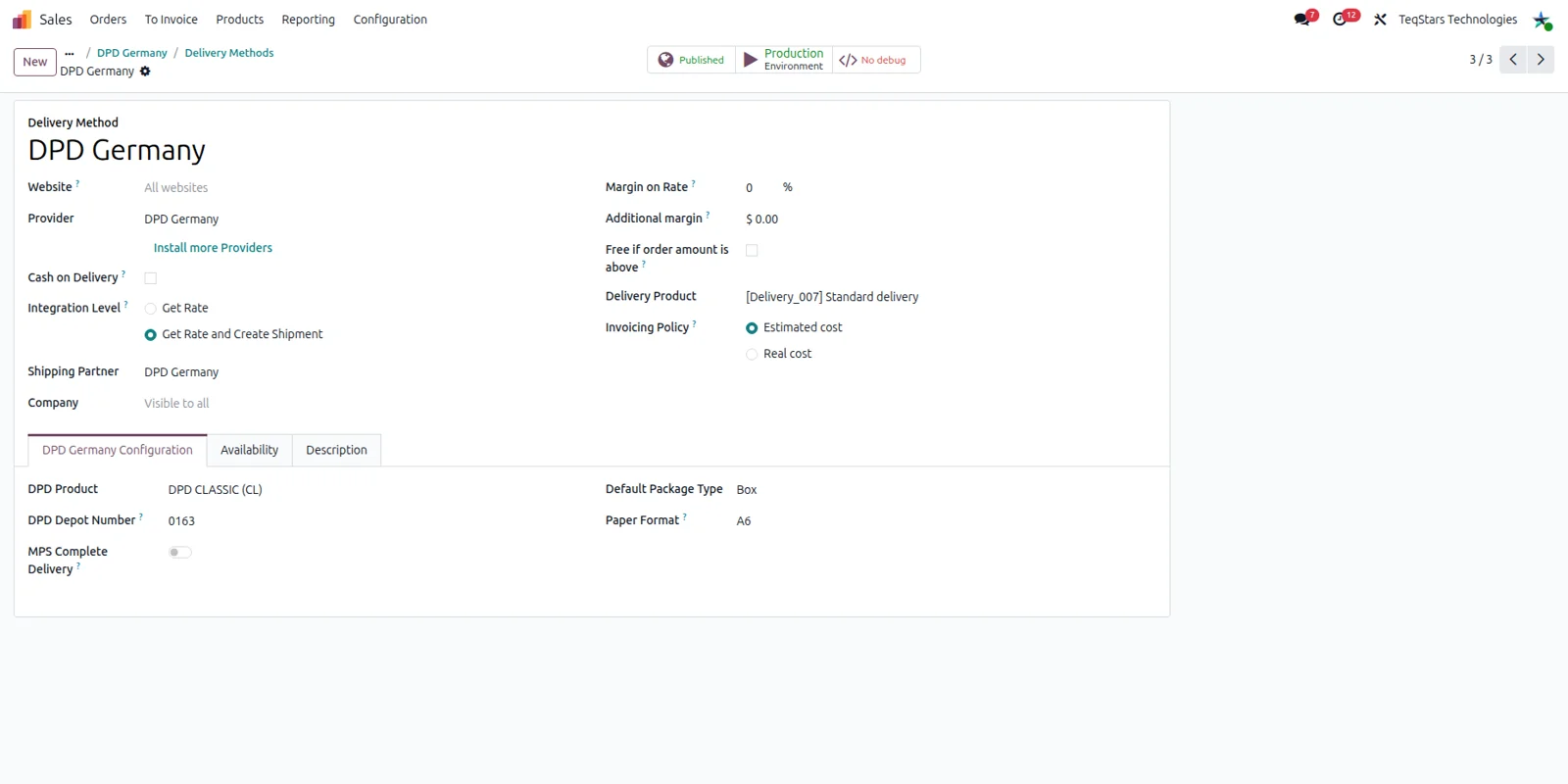
Your team ships DPD parcels using the same kind of Odoo delivery method they already know. On the delivery method record you pick DPD Germany as the provider and fill in the account details used for shipping. More than one DPD Germany account can be connected, so a business with separate contracts or brands gives each of them its own method.
Charge one fixed DPD shipping price
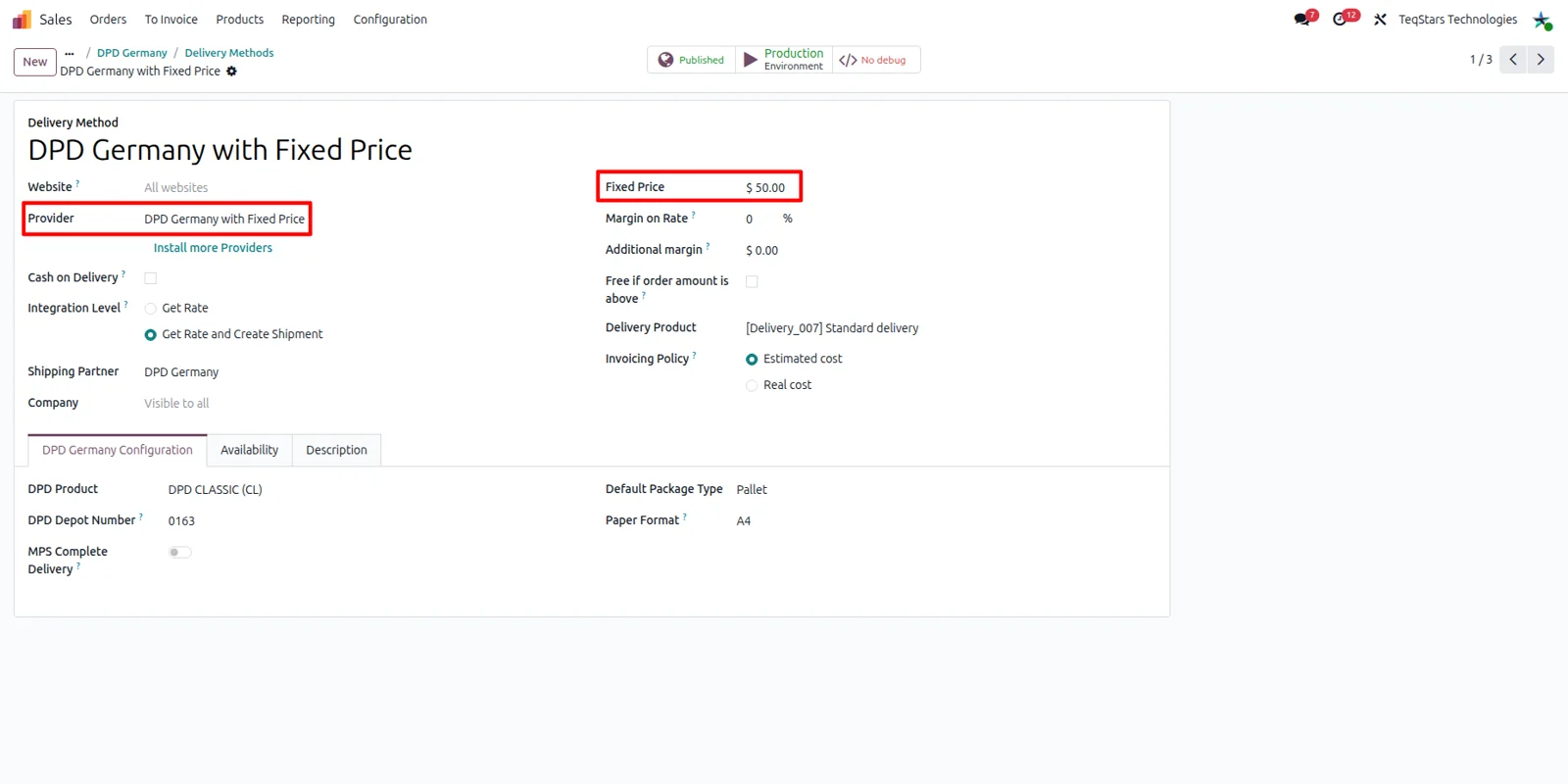
When the shipping charge is the same whatever the order looks like, put a single amount on the DPD delivery method. Odoo applies that figure every time the method is selected, for parcels staying in Germany and for shipments going further. Your sales team never has to look a price up, and every quotation shows the same number.
Price shipping with your own rules
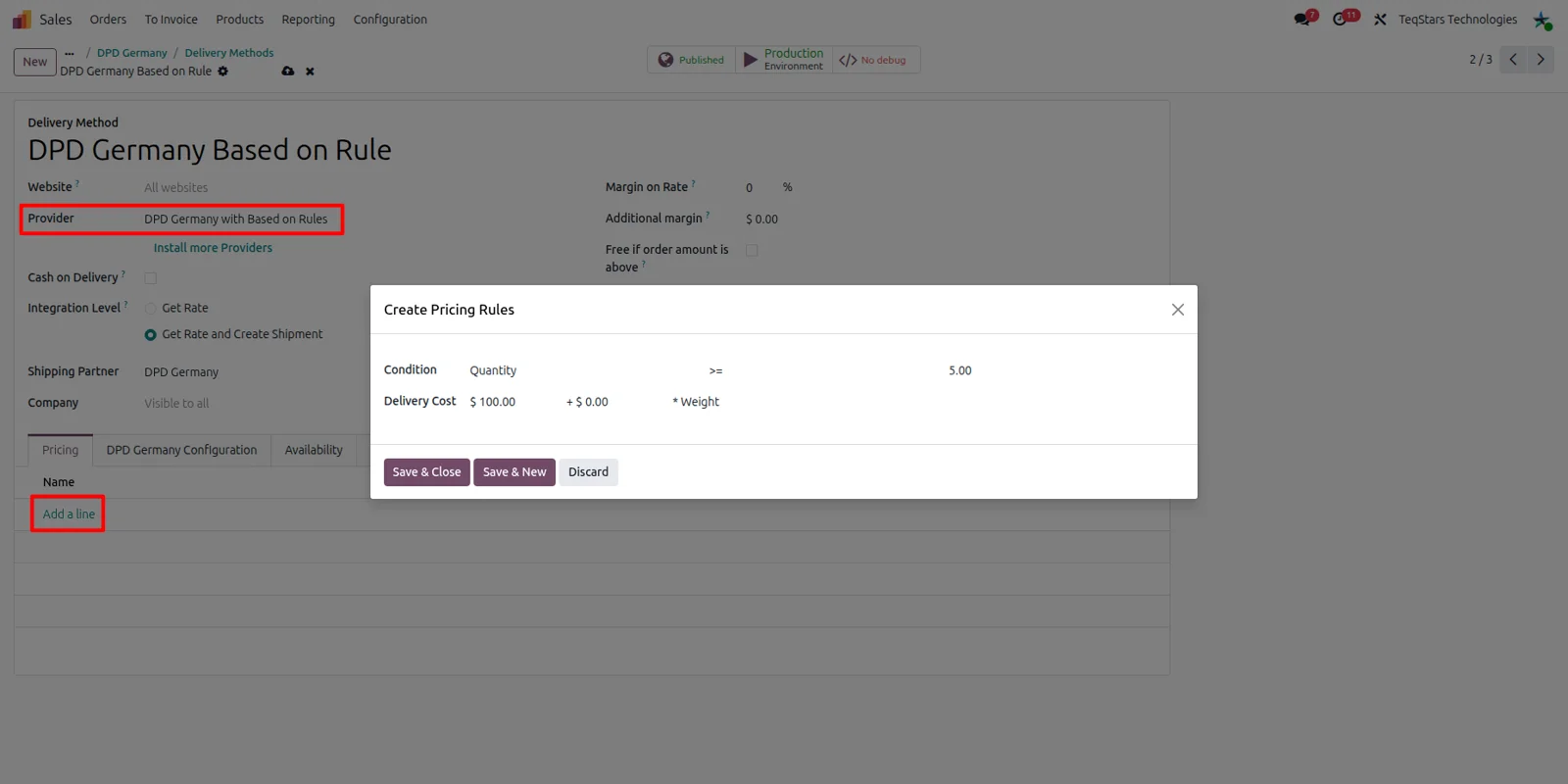
Build a short table of pricing rules when one flat charge is too blunt. Each line sits on the DPD delivery method with its own condition and amount, and Odoo picks the matching line when the order is priced. Since DPD Germany does not return live rates to Odoo, these rules decide what your customer actually pays for delivery.
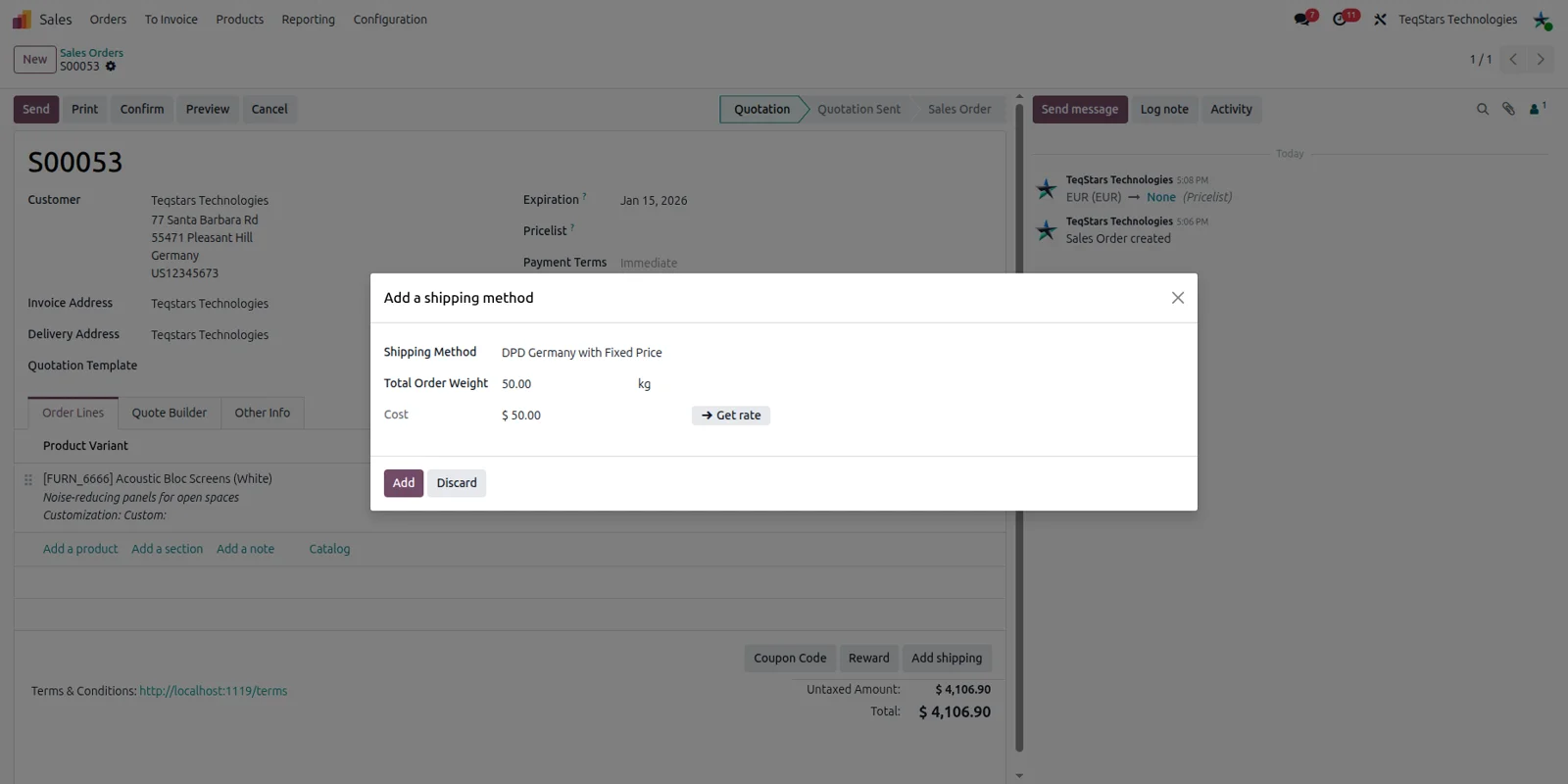
Add the DPD rate to a sales order
A salesperson selects the DPD Germany delivery method on the quotation and the shipping charge is added to the order. With a fixed-price method that is the amount you configured on the carrier. Because the calculation uses your own Odoo setup, quoting behaves the same way for a customer down the road and a customer abroad.
Ship one order in several packages
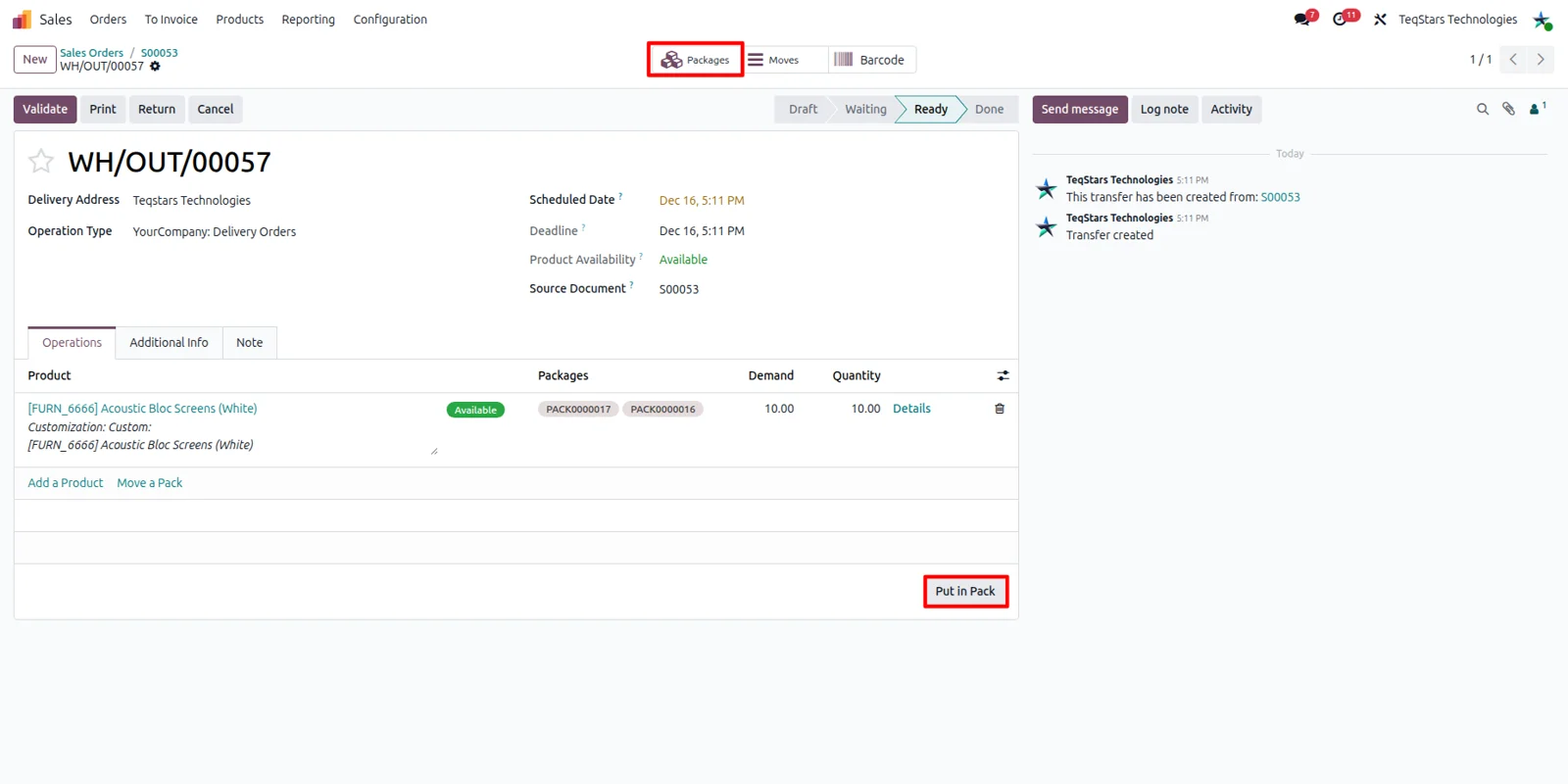
Plenty of orders will not fit in a single box. Use the "Put in Pack" button on the delivery order to split the quantities across packages before you validate it. Every package you create is part of the shipment sent to DPD Germany, so a multi-parcel delivery is described properly instead of being treated as one box.
Labels and tracking on the delivery order
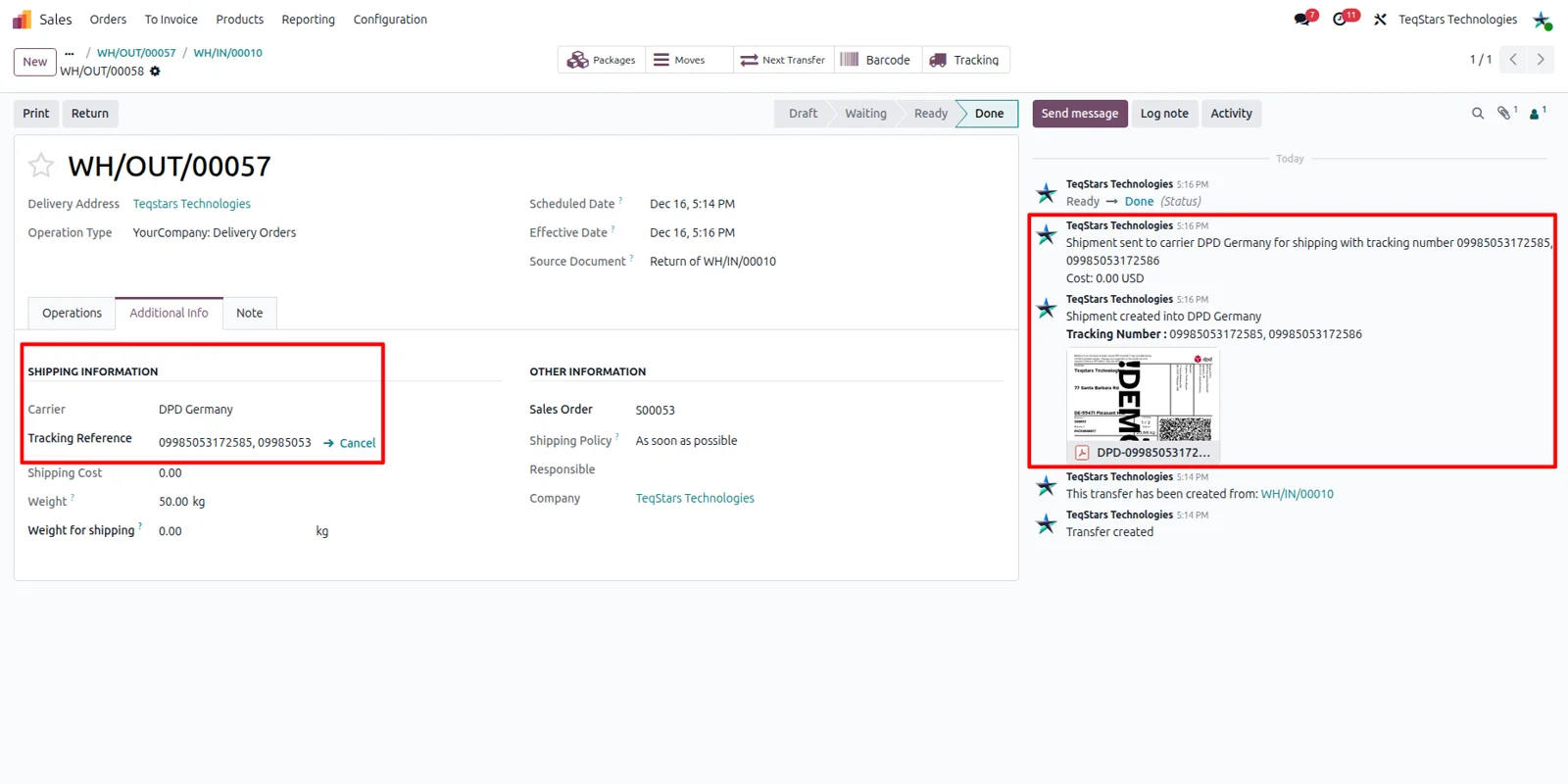
Validating the delivery order creates the DPD shipping label and the tracking number on that transfer. Your warehouse staff print the label and the parcel is ready to be handed over, with no second system to log into. The tracking number stays on the record, so anyone looking at the order can follow the parcel's status and location.
Supported Odoo versions
| Odoo version | Editions | Hosting | Price | Latest release | |
|---|---|---|---|---|---|
| 20.0 | Community & Enterprise | Odoo.sh · On-premise | €109.98 | No release notes | Buy |
| 19.0 | Community & Enterprise | Odoo.sh · On-premise | €109.98 | No release notes | Buy |
| 18.0 | Community & Enterprise | Odoo.sh · On-premise | €109.98 | No release notes | Buy |
| 17.0 | Community & Enterprise | Odoo.sh · On-premise | €109.98 | No release notes | Buy |
Support for DPD Germany Connector
The developers who build the app answer your tickets.
- Free app support from purchase
- 60 days
- First response in working hours, typical
- 4–6 hours
- Support hours, 10:00–18:00 IST
- Mon–Fri
How to connect DPD Germany to Odoo
-
Step 1
Install the connector
Add the app to your Odoo 17, 18, 19 or 20 database. It installs on Odoo Community and on Odoo Enterprise hosted on-premise or on Odoo.sh.
-
Step 2
Add your DPD accounts
Fill in the details of your DPD Germany account so Odoo can request shipments against your contract. Running several contracts? Each account is configured on its own, in the same database.
-
Step 3
Create the delivery method
Set up a delivery method and name DPD Germany as its carrier. Your sales and warehouse teams then choose this one record on quotations and on transfers.
-
Step 4
Decide how rates are priced
Choose what customers pay for shipping. One option is a single fixed amount on the carrier. The other is a list of pricing rules, each carrying its own condition and charge.
-
Step 5
Pack, validate and print
On the delivery order, use "Put in Pack" first if the goods go out in more than one parcel. Validating the transfer produces the label and the tracking number.
Questions before you buy
Not answered here? Talk to the team.