
Integration guide
To connect AI assistants such as Claude (by Anthropic), ChatGPT (by OpenAI), Google's Gemini CLI and Cursor to Odoo, you add an Odoo MCP server, which lets them work with live Odoo data through the Model Context Protocol (MCP). By default none of them can see inside your Odoo ERP; with it, your team asks questions, builds reports and acts on records from the chat it already uses.
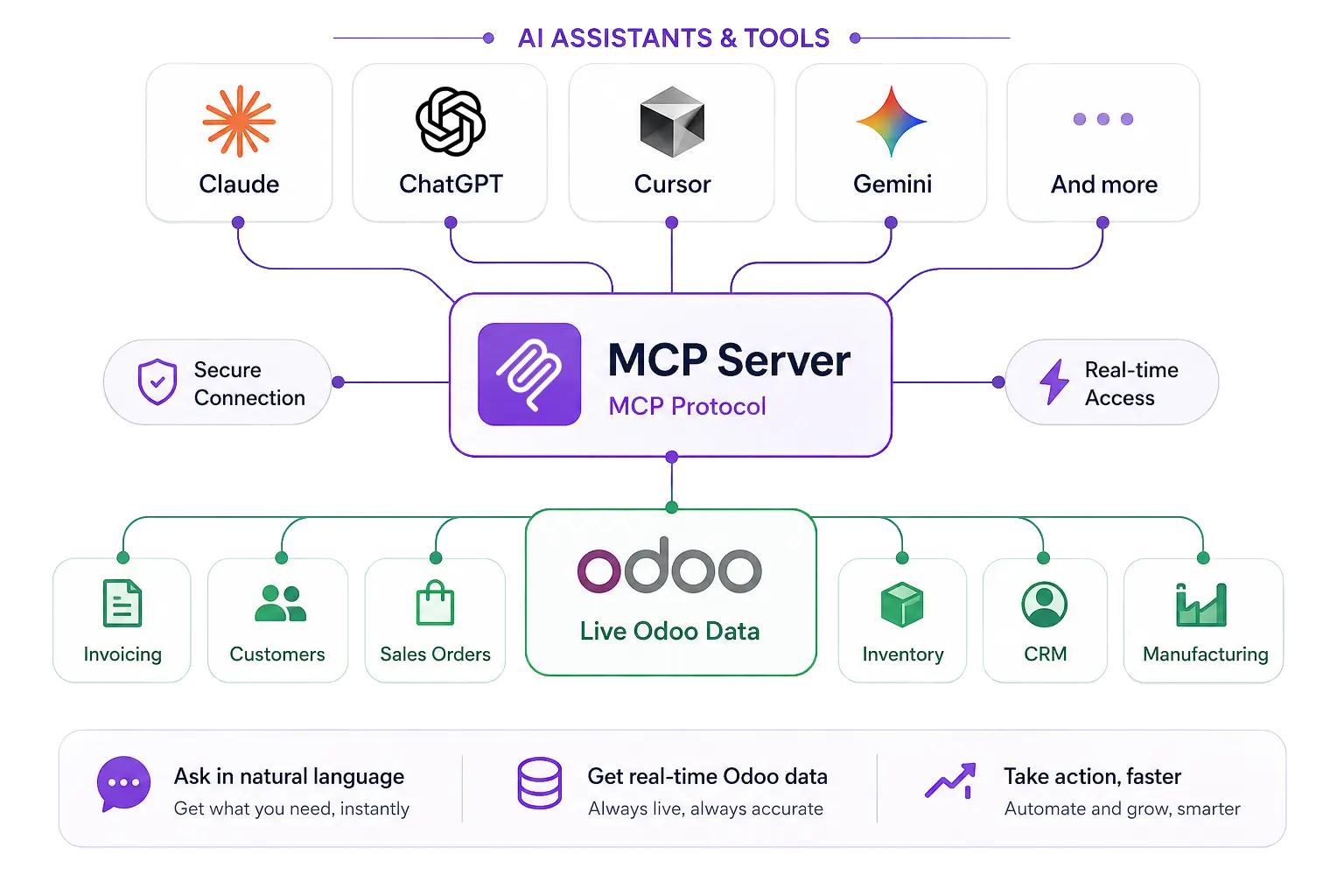
How does an Odoo MCP server connect AI assistants to Odoo?
An Odoo MCP server is the part of Odoo that speaks the Model Context Protocol. It publishes a list of tools, such as "search records" or "post a note", that an AI assistant can call. The assistant picks the tool that answers your question, Odoo runs it as your Odoo user, and the result comes back into the chat.
MCP itself is an open-source standard for connecting AI applications to outside systems; its documentation compares it to a USB-C port for AI applications. Anthropic introduced it in November 2024 and, in December 2025, handed it to the Agentic AI Foundation, a fund under the Linux Foundation co-founded by Anthropic, Block and OpenAI. According to Anthropic, ChatGPT, Cursor, Gemini, Microsoft Copilot and Visual Studio Code have adopted it.
The TeqStars Advanced MCP Server is a native Odoo module that turns your database into such a server. With one installation inside Odoo, your team can use Claude, ChatGPT, Gemini CLI, Cursor, Continue.dev and any other MCP-compatible tool to query live Odoo data, build reports, automate workflows and take real business actions, straight from their everyday AI chat window, with no custom development. The server runs inside Odoo itself: no Node.js, no Redis and no separate service to host.
You ask in the chat
"Show me overdue invoices" goes to Claude, ChatGPT or another assistant, which has read the list of tools your Odoo publishes.
The assistant calls an Odoo tool
It sends a tool call, such as a filtered search on invoices, to the MCP address with the connection's key or sign-in token.
Odoo answers as your user
Odoo checks the connection, runs the tool under that user's access rights and returns the result, which the assistant turns into a plain answer.
Why connect AI assistants to Odoo?
Connecting AI assistants to Odoo through MCP makes your ERP a live source of answers and actions for those assistants. Instead of copying data between systems or writing a new API connector for every AI tool, one native Odoo module exposes your business data under Odoo's own permissions, groups and record rules. The gap between AI assistants and company data closes: faster answers, reports built on current figures and automation with checks, all from one ERP.
The main benefits:
- Central AI access to live Odoo data
- Faster decisions, made on current figures
- Less manual work across teams
- Reports, charts and dashboards on request
- Answers from company documents, with the source quoted
- AI actions that respect Odoo permissions
- An audit trail of every AI request
- Several AI assistants served by one module
Teams work faster and bring AI into every part of Odoo without new infrastructure, custom code or losing control over their data.
What can AI assistants do with your Odoo data?
These are the day-to-day uses the TeqStars module covers. Each one relies on tools in the module's catalog, and each runs only when the connection is allowed to call that tool.
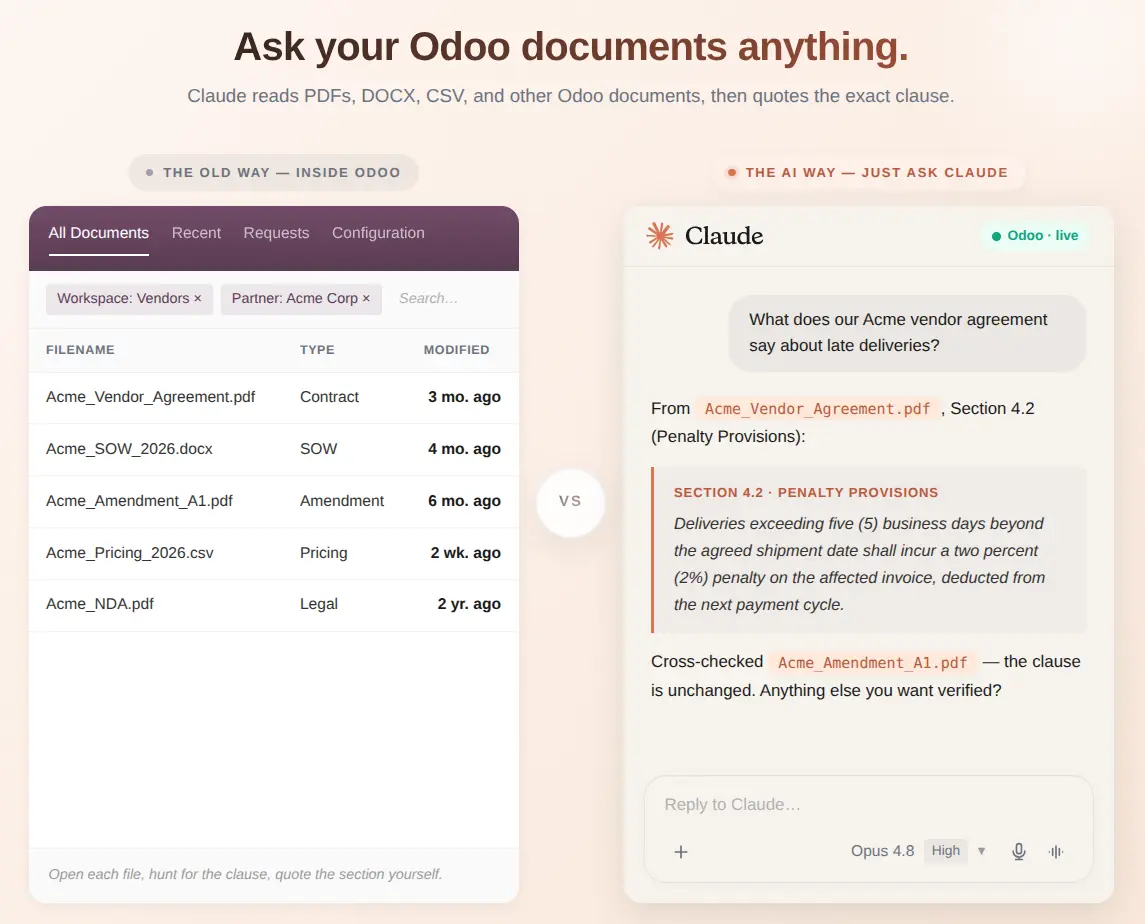
Ask your documents and get the exact clause
Every PDF, contract or attachment in Odoo becomes something your AI can read: Word, Excel, PowerPoint, OpenDocument, CSV, text and HTML files too. Ask a question and the answer comes back with the exact passage it came from, while your document permissions still apply. Basic Search uses PostgreSQL full-text search with no API key; Smart Search adds meaning-based matching through an embedding provider such as OpenAI, Cohere, Voyage AI or a self-hosted endpoint.
Use your own business words
The module maps common business terms, such as Customer, Order or Transaction, to the right place in your Odoo. Nine concepts come seeded, and per-company mappings narrow them, so the AI works naturally whether you are in retail, manufacturing, healthcare or services.
Get answers, charts and a health check
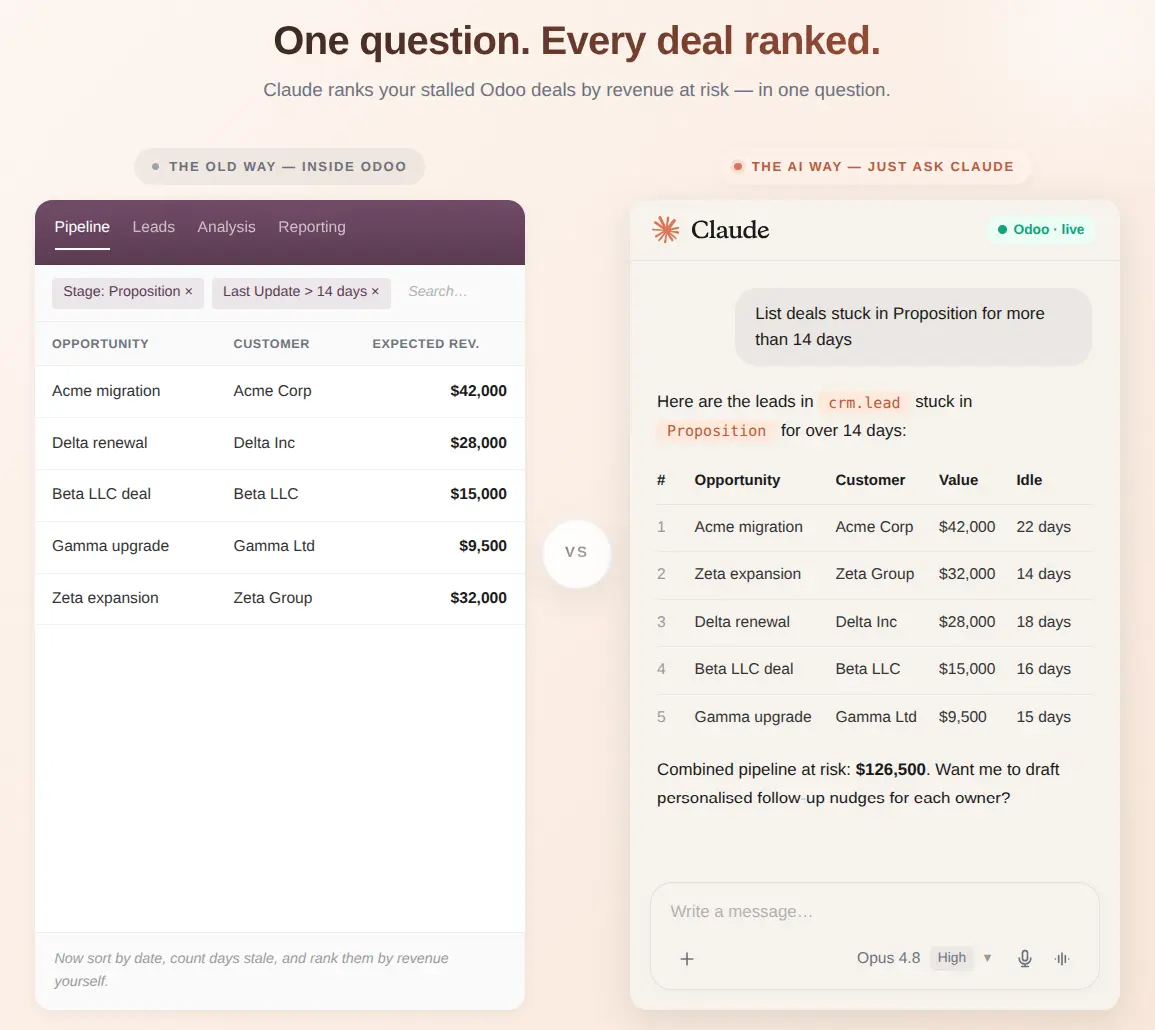
Ask in plain English and get answers, summaries or live charts, from bars and lines to funnels and sunbursts. The Pulse Report grades the business from A to F, with a grade for each area it can read: sales, invoicing, CRM, activities, the email queue, approvals, inventory and projects. The AI can also save a live dashboard as a link that opens without an Odoo login.
Act on records, with approval for the risky ones
Beyond reading data, your AI can take real action: create and update records, confirm orders, post invoices, schedule follow-up activities, post internal notes in a record's chatter and run bulk changes. Write tools accept a preview run that shows what would change without saving it. Actions you choose can be set to wait for approval, so nothing critical happens without your team's go-ahead.
Get alerts where your team works
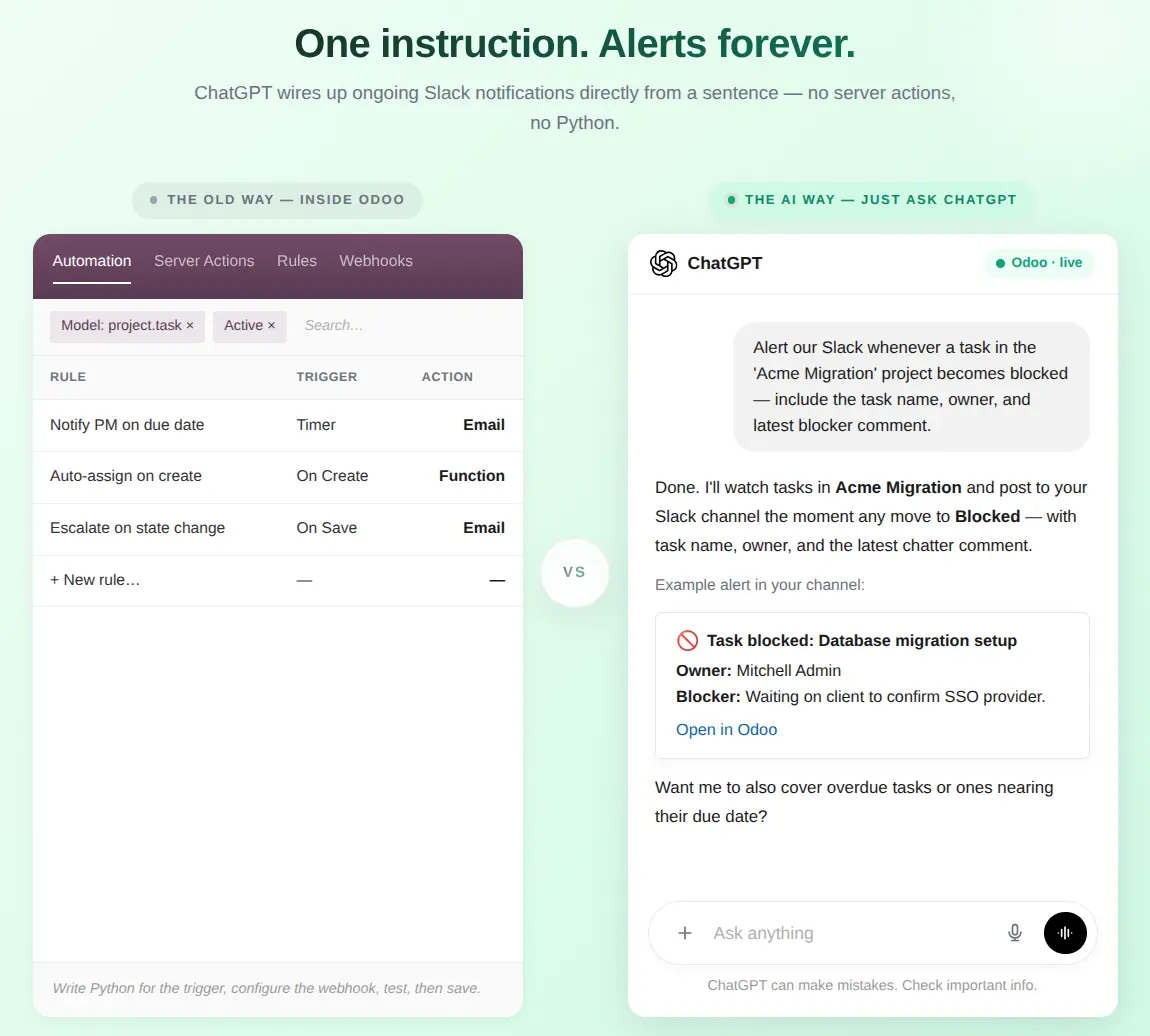
Ask the AI to watch a model and Odoo reports each new, changed or deleted record that matches, such as a large sales order or a task moved to Blocked. Alerts go to any webhook address, including Slack, Microsoft Teams and Discord incoming webhooks through a payload template, and keep coming even when the AI chat is closed.
Prepare campaigns without sending one by mistake
Marketing campaigns and bulk emails are always created as drafts. The AI prepares the template, sends a test email to your own address to check the content, and leaves the real send to a person, so no campaign goes out by mistake.
Claude, ChatGPT, Gemini CLI, Cursor: how each one connects to Odoo
Every MCP client reaches the same tools; what differs is how it signs in and what its own plan allows. The table pairs the module's connection type with what each vendor's help pages said in October 2026.
| AI assistant | Connection | What to check on the AI side |
|---|---|---|
| claude.ai and Claude Desktop | Browser login | Custom connectors work on Free (one connector), Pro, Max, Team and Enterprise. Requests come from Anthropic's cloud. |
| Claude Code | API key | Add it with claude mcp add --transport http; --scope user makes it available in every project. |
| ChatGPT | Browser login | Full MCP with write actions is in beta for Business, Enterprise and Edu, on the web only. An admin turns on developer mode; Pro gets read and fetch only. |
| Gemini CLI | API key | Goes in ~/.gemini/settings.json under httpUrl. Since 18 June 2026 it serves only Code Assist Standard or Enterprise and paid API keys. |
| Cursor | API key | Goes in ~/.cursor/mcp.json as a url with an Authorization header, or in .cursor/mcp.json for one project. |
| Continue.dev | API key | Goes in ~/.continue/config.json; restart the IDE afterwards. |
| Your own app or script | Custom OAuth or API key | Runs the OAuth 2.1 authorization code flow with PKCE, or sends Authorization: Bearer on every request. |
Sources: Claude Help Center, OpenAI Help Center, Google for Developers and the Cursor docs. For Claude and ChatGPT step by step, read how to connect Claude to Odoo and how to connect ChatGPT to Odoo.
Gemini CLI changed in June 2026
Google stopped serving Gemini CLI to Google AI Pro, Ultra and free Gemini Code Assist accounts on 18 June 2026 and points them to Antigravity CLI, which also reads MCP servers. The module works with any client that sends a Bearer header or signs in with OAuth 2.1.
Browser login, API key or custom OAuth: which connection fits?
Choose by how the tool signs in, not by its name. The module's Connect a New Tool wizard offers three cards:
Browser login
For claude.ai, ChatGPT and Claude Desktop. The assistant opens Odoo's consent page, the user clicks Allow Access, and the connection appears in Odoo. Assistants register themselves unless an admin switches dynamic registration off.
API key
For Cursor, Claude Code, Gemini CLI, Continue.dev and scripts. The key travels in an Authorization: Bearer header and is shown once, because Odoo stores only its hash.
Custom OAuth
For your own backend or chatbot platform with its own callback URL, as a confidential client with a secret or a public client using PKCE.
What do you need before you connect AI assistants to Odoo?
- Odoo 17.0, 18.0, 19.0 or 20.0, Community or Enterprise, on Odoo.sh or your own server. Odoo Online does not allow third-party apps.
- A public HTTPS address for Odoo if you use claude.ai or ChatGPT, since their requests come from the vendor's cloud.
- The public address in Odoo's web.base.url parameter, because the MCP link is built from it.
- A reverse proxy that forwards /odoo/mcp and the /oauth/ paths to Odoo.
- An AI plan that allows custom MCP connectors, as listed in the table above.
- One Odoo user per person, with only the access rights that person needs.
- An embedding provider key only if you want Smart Search over documents.
How to connect an AI assistant to Odoo in four steps
Configure the MCP server settings
Install the module, give yourself the MCP Administrator role, then open MCP Server, Configuration, Server Settings and switch the server to Enabled. Choose what your AI may reach: the data, tools and documents to expose, and the limits that match how your team works.
Create a secure AI connection
Run Connect a New Tool once for each person and assistant. Pick a quick API key or browser login (OAuth), then choose which tools and models the connection may use, which actions need approval and, for API keys, its request limits.
Connect your AI client
Paste the MCP link or the ready-made snippet from the wizard into Claude, ChatGPT, Gemini CLI, Cursor, Continue.dev or another MCP-compatible tool, and sign in if it asks. The standard clients need no developer.
Start talking to your Odoo
Ask in plain English: "Show me overdue invoices", "Draft a follow-up for cold leads" or "Alert Slack on new orders". The assistant works within your Odoo permissions, and every tool call is logged.
The complete user guide covers every screen
Read the Advanced MCP Server user guide and its AI client setup page, try the free demo, or watch the video tutorials on YouTube.
Advanced MCP Server or custom development?
For most teams, the TeqStars Advanced MCP Server is the ready route: one module inside Odoo 17.0 to 20.0, Community or Enterprise, with approvals, an audit log, document search and charts already built. Custom development fits processes no ready tool covers, at the cost of building and maintaining every piece yourself.
| TeqStars Advanced MCP Server | Custom development | |
|---|---|---|
| Odoo versions and editions | 17.0 to 20.0, Community and Enterprise, Odoo.sh or your own server | Any version you build for |
| Sign-in | API key, browser login (OAuth 2.1) or custom OAuth | What you build |
| Tools | 45 or more tools for reading, writing, reports, chatter, email, alerts, documents and charts, each switchable | Only the tools you write |
| Control and audit | Approvals, allowed tools and models, IP rules and a read-only audit log in Odoo | What you build |
| Client setup | Snippets for Cursor, Claude Code, Gemini CLI, Continue.dev and curl; a link for claude.ai, ChatGPT and Claude Desktop | You write the guide |
| Upkeep | Updates for the Odoo version you bought, with TeqStars support | Your team, for every Odoo and MCP change |
Custom development usually means a separate server that calls Odoo's external API. On Odoo 19 and later, new code should use the JSON-2 API: the XML-RPC and JSON-RPC endpoints are scheduled for removal in Odoo 22 (fall 2028), and Odoo offers the external API only on its Custom pricing plans.
Is it safe to connect AI assistants to Odoo?
It is as safe as the rights you give the connection. Each connection acts as one named Odoo user, and the data tools run as that user with no extra privileges, so reads and writes follow that user's groups and record rules. The module adds limits on top, never fewer. Sign-in is secure, access is set per AI tool, and every tool call is logged with who did what and when.
Allowed tools and models
Each connection can list the tools and the Odoo models it may use. Calls outside the list are refused with a clear message, so a reading connection cannot call a deleting tool.
Approvals for risky actions
Tools you mark wait for a person. Only the assigned approver or an MCP Administrator sees Approve and Reject; approved calls run with the requester's rights.
Request limits
API-key connections carry a per-minute and a per-day request limit, set per connection, which stops a looping prompt early.
IP restrictions
An IP whitelist and blacklist per connection, one address or CIDR range per line, make a leaked key much less useful.
Read-only audit log
Each tool call keeps the user, connection, tool, model, IP address, duration and status. Nobody can edit or delete entries, administrators included.
Rotate and revoke
Rotate Key issues a new key; revoking deletes it, ends live sessions and expires pending approvals, while the log keeps the history.
Each connection acts as one named Odoo user, so the AI never sees more than that person can.
The assistant's side needs the same care. Anthropic does not verify custom connectors and advises approving tool requests carefully and watching for prompt injection. OpenAI warns that untrusted MCP servers increase exposure to prompt injection, and ChatGPT may ask for confirmation before write actions. Whatever a tool returns goes into the chat, so it reaches the AI provider under that provider's terms.
Check payload logging and shared dashboards
With Log Request/Response Payloads on, the audit log keeps full requests and responses, which can include customer details. A shared dashboard link shows its owner's data to anyone who has it, until you revoke the page.
A good fit when
- You run Odoo Community or Enterprise on Odoo.sh or your own server
- Your team already uses Claude, ChatGPT, Cursor or another MCP client
- You want approvals and a log before AI changes records
- Several people need their own access with their own rights
Look at it again when
- Your database is on Odoo Online, which does not allow third-party apps
- Odoo is not reachable over HTTPS and you need claude.ai or ChatGPT
- Your ChatGPT plan lacks full MCP, which write actions need
- Every alert must arrive: each webhook is sent once, with no retry
- Your documents are scanned PDFs without a text layer, which are skipped
Why won't my AI assistant connect to Odoo?
Most failures come from the address, the key or a connection setting. Work through the symptom you see; the troubleshooting guide covers more cases.
| What you see | Likely cause | What to check |
|---|---|---|
| "Cannot reach server" or no answer | Wrong address, server switched off, or the proxy drops the path | Server Settings shows Enabled, web.base.url is the public address, and the MCP address answers 401 rather than 404 |
| "Unauthorized" | Typo in the key, revoked connection, expired token or a blocked IP | The connection is active, the header reads Bearer, one space, then the key, and the IP rules allow the client |
| "Rate limit exceeded" | An API-key connection hit its per-minute or per-day limit | Raise the limit on the connection, and group the audit log by tool to find a looping prompt |
| A tool is missing | The tool is inactive, outside the connection's allowed tools, or switched off in Server Settings | MCP Server, Configuration, Tools, and the connection's Allowed Tools |
| "Awaiting approval" never clears | No approver picked, or the request expired | The Approver on the connection, and the Approval Requests list |
| ChatGPT calls fail after an update | ChatGPT keeps a frozen copy of the tool list | An admin refreshes the app's actions in ChatGPT workspace settings |
| The AI cannot find a document | Indexing is paused, or the file was excluded or failed | MCP Server, Knowledge, Indexed Sources, and the state of that file |
Why teams choose the TeqStars Advanced MCP Server
Many Odoo AI integrations run as an extra server, a third-party service or custom code, which adds cost, moving parts and security risk. The TeqStars module takes a different approach: one native Odoo module, one secure setup and one place to manage every AI tool your team uses. Built by the Odoo specialists at TeqStars, it brings AI inside Odoo with no separate service, no development work and no tie to one AI vendor.
- 17.0 to 20.0Odoo versions the module ships for
- 3ways to connect: browser login, API key, custom OAuth
- 45+tools in the module's catalog, each one switchable
- 8business areas graded A to F in the Pulse Report
- AI workflows inside Odoo: read, report on and act on records
- Multi-client support: Claude, ChatGPT, Gemini CLI, Cursor and every MCP-compatible AI
- Several AI assistants side by side, across the companies each Odoo user can access
- Approval gates and audit logs for every connection
- Built-in knowledge base, reports and visual analytics
- Runs fully inside Odoo: no Node.js, no Redis, no external services to host
- Supports Odoo Community, Enterprise and Odoo.sh deployments
- Dedicated TeqStars support and a free live setup session with the developer
The Advanced MCP Server is rated 5 out of 5 on the Odoo Apps Store (October 2026).
I have connected it with both ChatGPT and Claude, and the integration works smoothly.
Frequently asked questions
Is MCP the same as Odoo's external API?
No. Odoo's external API (JSON-2 from Odoo 19, XML-RPC and JSON-RPC before) lets programs call Odoo methods. MCP is a layer for AI assistants: it describes tools in a form a model can choose from and call. Many Odoo MCP servers call the external API underneath; the TeqStars module runs inside Odoo instead.
Which ChatGPT and Claude plans can connect to an Odoo MCP server?
In October 2026, Claude allowed custom connectors on Free (one connector), Pro, Max, Team and Enterprise. ChatGPT offered full MCP, including write actions, in beta to Business, Enterprise and Edu workspaces on the web, while Pro users could connect with read and fetch permissions in developer mode. Check the vendor's help page before you buy, as these rules change.
Do I need an OpenAI or Anthropic API key to connect AI to Odoo?
No. The AI runs in the assistant you already pay for; the Odoo MCP server only handles sign-in, the tool list and the data. The one exception in the TeqStars module is Smart Search over documents, which needs an embedding provider and its API key. Basic Search needs no key.
Can an AI assistant change or delete Odoo records?
Only if the connection allows the tool and the Odoo user has the right. Write tools accept a preview run that changes nothing, and you can put delete, method calls, state changes or mass mailing behind an approval, so a person signs off before the action runs.
Does Odoo need to be public on the internet for MCP?
For claude.ai and ChatGPT, yes: their requests come from Anthropic's and OpenAI's cloud, so Odoo needs a public HTTPS address (OpenAI offers Secure MCP Tunnel for private networks). Tools that run on your computer, such as Claude Code, Cursor or Gemini CLI, only need to reach Odoo from that computer.
Can I still use Gemini CLI with Odoo?
Yes, if your account still has it: since 18 June 2026 Gemini CLI serves Gemini Code Assist Standard and Enterprise licenses and paid API keys. Add the Odoo MCP address under httpUrl in ~/.gemini/settings.json with a Bearer header. Google points other accounts to Antigravity CLI, which also reads MCP servers.