
Integration guide
Odoo Mirakl integration is a direct link between your Mirakl seller account and your Odoo database: marketplace orders arrive in Odoo as sales orders, and Odoo sends stock levels and dispatch details back to Mirakl, instead of exporting order files and typing them in again. The TeqStars Mirakl Connector does this for any Mirakl-powered marketplace.
Every morning starts the same way. You log into the Mirakl seller portal, export the overnight orders, and re-key them into Odoo one at a time. Then you correct stock figures so you do not oversell, and paste yesterday's tracking numbers back into the marketplace.
None of this work is hard. It is simply time you never get back, and each manual step is a chance for a wrong quantity, a missed dispatch, or a refund you should not have had to give.
What does Odoo Mirakl integration do day to day?
It turns each Mirakl order into an Odoo sales order with the customer, delivery address, taxes and shipping charge filled in, and sends your Odoo stock and your carrier and tracking number back to the marketplace. You can run any number of Mirakl marketplaces from one Odoo database, each with its own settings.
One Mirakl connector for Odoo covers every Mirakl-powered marketplace, because they all share the same Mirakl seller API. Mirakl says more than 450 enterprise businesses use its platform, and the retailers running marketplaces on it include Carrefour, Decathlon, Leroy Merlin, Best Buy Canada and Macy's. Each marketplace runs its own Mirakl instance, at its own web address and with its own API key, and each operator sets its own rules, such as how long you have to accept an order.
That API is simply the standard set of instructions a seller's system uses to read orders and send back stock and tracking. It is why you do not need a separate integration built for each retailer you sign with, and why adding your next operator is configuration rather than a project.
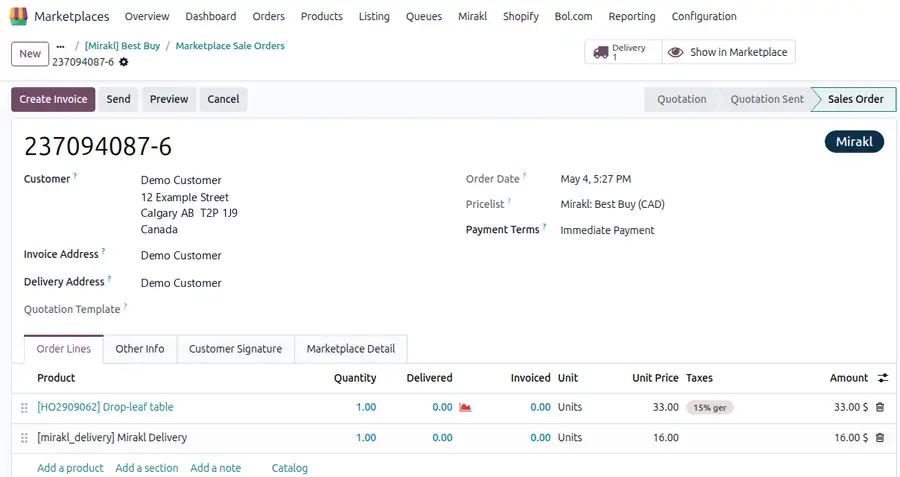
Connected, in practice, means this. An order placed on the marketplace appears in Odoo as an ordinary sales order, with the customer, delivery address, taxes and shipping charge already filled in. You pick and pack it like any other order. Once you validate the delivery, the carrier and tracking number go back to the marketplace on the next scheduled run, or straight away when you click Update in Marketplace, and the order shows as shipped.
What does manual marketplace work quietly cost you?
Three costs, and none of them shows up on an invoice until it is too late:
Cancellations from stale stock
Update quantities once a day and they are wrong for most of it. The marketplace keeps selling what you no longer have.
A seller rating that slips
Operators score you on dispatch speed and valid tracking. Numbers pasted in on Friday for parcels that left Tuesday cost you visibility.
Errors and month-end drift
A transposed postcode becomes a return and a refund. Typed-in tax and shipping figures mean payouts never quite match finance.
What is the difference between a Mirakl product and an offer?
Mirakl separates the catalog product from your offer. The product is the entry the operator owns, with its title, images and attributes. Your offer is what you attach to it: your price, your available quantity, your condition and your lead time.
Almost every point of confusion for new Mirakl sellers traces back to this split. It is why a product can exist on the marketplace while your offer is not yet live, why catalog changes need operator approval but price changes do not, and why matching happens on your own shop SKU rather than the operator's catalog identifier.
Your Odoo internal reference is the key that holds it together. Keep it accurate, and the connector links every offer to the right product on its own, by your shop SKU. The EAN, UPC or MPN the operator holds is stored on the listing as a product reference, but it is not used for matching. Let duplicate SKUs creep in, and that is where mismatches start.
How do your products and offers get onto Mirakl?
You create them in Mirakl, and Odoo picks them up. The operator controls its catalog and approves new products, so products and offers are set up in the Mirakl Seller Portal, through the operator's own catalog process. The TeqStars connector does not create products or offers on Mirakl from Odoo.
Once an offer is live, Import Listings/Offers brings it into Odoo as a listing and links it to your Odoo product by SKU. Each listing keeps the product description, its references, the offer state, the logistic class, the shipping zone, the channels and the lead time to ship. You can import every offer or only the SKUs you name.
- Create Odoo Products? creates the Odoo product when an offer's SKU is new to Odoo. Leave it off when your catalog already lives in Odoo.
- Update Price? writes the Mirakl price into the marketplace's pricelist in Odoo, as a fixed price.
- The operator's own reference data is imported, not guessed at: product categories, channels, shipping zones, logistic classes, carriers and offer states.
Prices and catalog changes stay in Mirakl
Odoo sends stock and tracking to Mirakl, not prices or product data. Change an offer's price, a product's attributes or its images in the Mirakl Seller Portal.
What syncs between Mirakl and Odoo, in each direction?
Everything the Odoo Mirakl connector moves, and which way it travels:
| What | Mirakl to Odoo | Odoo to Mirakl |
|---|---|---|
| Orders | Arrive as ordinary Odoo sales orders with customer, delivery address, taxes and the shipping charge | Not sent |
| Cancellations | Cancel the Odoo sales order and its open delivery, with Mirakl's reason in the chatter, so nothing ships by mistake | Not sent |
| Offers and listings | Imported and linked to your Odoo products by shop SKU | Not created from Odoo; Odoo updates their stock |
| Stock | Imported orders reduce Odoo stock like any other sale | The quantity of the marketplace's warehouse, on the schedule you set or when you export it |
| Tracking and dispatch | An order already shipped on Mirakl validates its Odoo delivery with the tracking reference | Carrier and tracking number once you validate the delivery, order marked shipped |
| Prices | Imported into that marketplace's pricelist | Set in Mirakl, not sent from Odoo |
| Reference data | Categories, channels, carriers, shipping zones, logistic classes and offer states | Not sent |
| Tax treatment | Tax-inclusive or tax-exclusive mode read per order, so invoices match what Mirakl charged | Not sent |
Cross-border orders get the right carrier
Operators often reuse the same carrier name in different countries, so "DHL" on a German marketplace is not the same delivery method as "DHL" on a Spanish one. When several of your Odoo delivery methods share a carrier name, the connector picks the one set for the order's destination country, so the buyer receives a tracking link that actually works.
How often does Mirakl stock sync run in Odoo?
As often as you set it. Every automatic update is an ordinary Odoo scheduled task that you control. You can open it, change the interval, pause it, or run it immediately from the Automatic Jobs tab of the marketplace. Nothing is fixed behind the scenes and nothing is hidden from you.
Because each marketplace is configured separately, each can have its own rhythm. A high-volume operator might pull orders far more frequently than a smaller one, and stock can go out more often than tracking. The connector ships with defaults that work on day one, and you adjust the timing whenever your volume changes.
Three jobs run for each marketplace: Import Order, Export Product's Stock to Mirakl and Export Order Status/Tracking Information to Mirakl. Each stock export sends the products whose stock moved since the last one, using the quantity you choose in Stock Based On: on hand, free to use or forecasted, from the marketplace's warehouse.
You also choose which orders reach Odoo at all. A Mirakl order moves through several stages, waiting for acceptance, then payment, then ready to ship, then shipped and closed. Most sellers pull only orders that are ready to ship, the default, so Odoo fills with work the warehouse can act on rather than orders still waiting on the buyer. If you would rather watch the acceptance window on an operator whose deadline is short, since Mirakl refuses an order nobody accepts in time, you can include those stages too; accepting the order itself still happens in Mirakl.
Cancellations follow the same filter: Odoo cancels an imported order when the order import fetches it again in its canceled stage, and the import fetches only the stages you selected. Our support team can tell you which stages suit your operator before you change the filter.
Can one Odoo database run several Mirakl marketplaces?
Yes, with no limit and no per-marketplace fee. Mirakl marketplace integration in Odoo is configured per connection, so expanding onto a new operator is an operational decision rather than a budget one. Each connection has its own credentials, warehouse, currency, pricelist, payment workflows, order filter and sync timing.
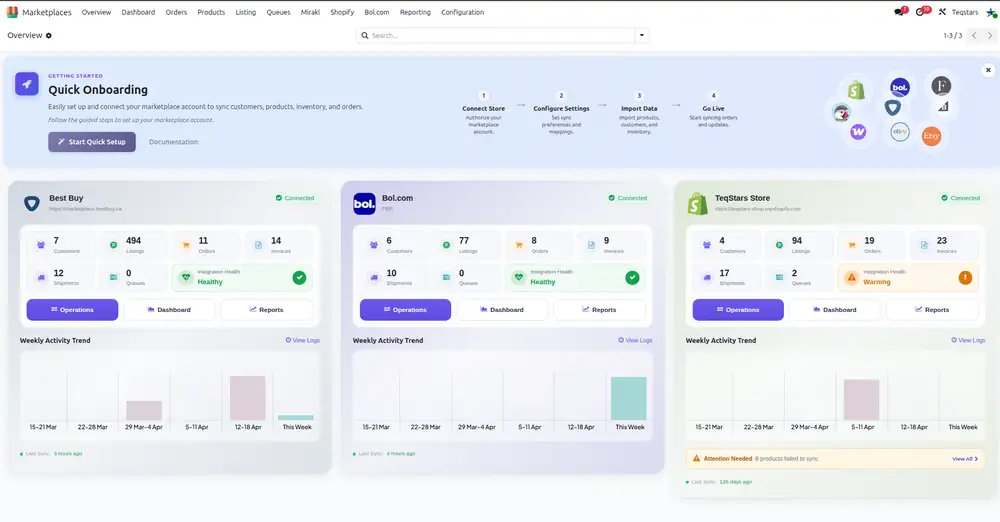
That independence matters because Mirakl operators span Europe, North America, Latin America and Asia-Pacific, and a seller shipping from two warehouses in two currencies needs those differences respected rather than flattened. What you get back is one view across all of them: orders from every marketplace in the same Odoo pipeline, drawing on the same inventory, reported together.
A sample of Mirakl-powered marketplaces sellers connect to Odoo. Any other Mirakl operator works the same way.
| Region | Marketplaces |
|---|---|
| France | Carrefour, E.Leclerc, Auchan, Leroy Merlin, Castorama, Decathlon, La Redoute, Conforama, Maisons du Monde, Galeries Lafayette, Truffaut, Cultura |
| UK, Germany and wider Europe | B&Q, The Range, MediaMarkt, Saturn, Douglas, Shop Apotheke, Fressnapf, Manor, Worten, El Corte Inglés |
| North America | Best Buy Canada, Nordstrom, Macy's, Kohl's, Lowe's, Urban Outfitters |
| Australia | Bunnings |
Marketplace names are examples of retailers operating on the Mirakl platform. TeqStars is an independent Odoo app publisher and is not affiliated with or endorsed by these brands. All trademarks belong to their respective owners.
Already selling elsewhere? The same approach covers Bol.com marketplace integration with Odoo, and our Odoo integration services cover the connectors and custom links that sit alongside it.
What happens when a Mirakl import fails?
You see it straight away, and one problem order never blocks the rest of the batch. Each order is processed on its own, and errors are recorded per order, in plain language, on the queue line. You read what went wrong, correct it, and retry with one click, while the other ninety-nine import normally.
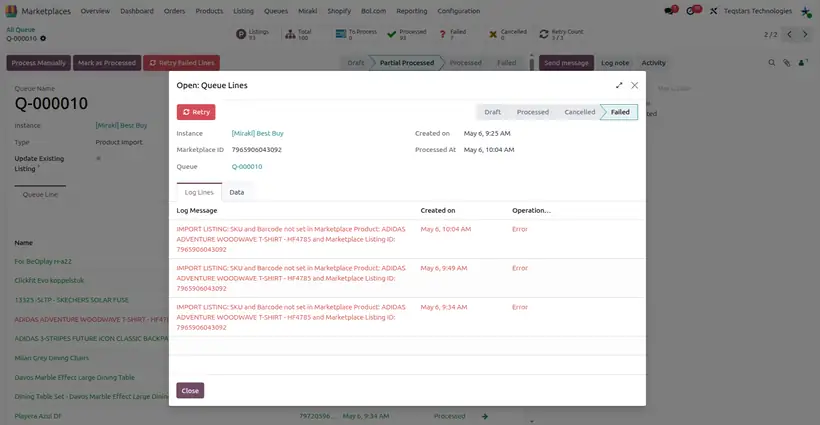
The message tells you what to do next. An order line whose SKU is unknown says to create that product in Odoo with that SKU and import the order again; an order with no matching payment workflow takes you to the workflow setup. A tracking push that Mirakl refuses flags the delivery with the exact error, and a failed queue line is retried before Odoo assigns an activity to the person you chose.
Access is handled sensibly too. Warehouse staff can run imports and dispatch orders while the Credentials tab, API key included, stays with the Marketplace Manager role. If you would rather hand the running of it to someone else entirely, that is what our Odoo support team does.
Testing safely before you go live
A restored copy of your database cannot touch the live marketplace. Every Odoo team eventually restores production into a test database, and on a marketplace connector that is exactly when accidents happen. When Odoo neutralizes a restored database, the connector's Go Live? switch is turned off and every Mirakl request is blocked until someone explicitly turns it back on, so you can train staff, rehearse a migration or debug a workflow without the operator ever seeing it.
How to connect Mirakl to Odoo
You need two things from your Mirakl seller account: an API key and the marketplace web address. Your shop ID is optional, because Odoo reads your default shop from Mirakl. Setup is configuration, not code, and a guided panel inside Odoo walks you through it. The Mirakl connector user guide covers every screen.
-
Generate your Mirakl API key
Mirakl seller account › your user name › My user settings › API key
In your Mirakl seller account, open your own user settings and generate an API key. Note the marketplace web address you sign in at while you are there, and your shop ID if you run several shops under one account.
Copy the key as soon as Mirakl shows it, and keep it where only the person managing the marketplace can read it. A test environment from the operator comes with its own key.
-
Add the marketplace in Odoo
Marketplaces › Configuration › Instance
- Install the connector, create an instance, name it after the marketplace and choose Mirakl.
- On the Credentials tab, enter the Marketplace URL and the API Key, plus the Shop ID if you have several shops.
- Click Test Connection. Nothing else is needed to establish the connection.
Odoo Online cannot install third-party apps. The database must run on Odoo.sh or on your own server.
-
Decide how orders and stock behave
These settings shape every order that arrives, so settle them before the first import:
- Warehouse: where this marketplace's stock is counted and its orders ship from.
- Stock Based On: on hand, free to use or forecasted quantity.
- Order Status: the Mirakl stages to import; ready to ship is the default.
- Tax System: Odoo's product taxes, or the taxes Mirakl sends (see the table below).
- Use Marketplace's Order Currency? and Create Odoo Products?
-
Add payment workflows and press Confirm
Add a workflow line for each Mirakl payment type and payment status you receive. The workflow decides how far an imported order goes on its own: confirmed, invoiced, invoice validated, payment registered.
Then click Confirm. Odoo checks the key, finds your shop and its currency, creates the marketplace pricelist if needed, and imports the operator's categories, channels, carriers, shipping zones, logistic classes and offer states by itself.
-
Import, then set your timing
Marketplaces › Overview › Operations
Bring in your offers with Import Listings/Offers first, so every order line finds its product. Then import a first batch of orders by date or by Mirakl order number and check the result. Finally, on the Automatic Jobs tab, choose how often each update should run, switch the jobs on, and leave it working.
New Mirakl orders appear in Odoo as sales orders, and the marketplace shows your Odoo stock and your tracking numbers.
Help is included, not an add-on. The guided setup panel walks you through the sequence, the user guide covers every screen, and 60 days of support from the developers come with the app. For heavier changes, our custom Odoo development team can adapt the workflow to how you actually operate.
Which Tax System setting should you choose?
The one that matches who decides the tax on a marketplace sale. The Tax System setting on each Mirakl marketplace offers three behaviors:
| Setting | What Odoo does with the order's taxes | Fits when |
|---|---|---|
| Odoo's Default Tax Behaviour | Ignores Mirakl's tax lines and applies the taxes on your Odoo products, adjusted for Mirakl's tax-included or tax-excluded prices | Your Odoo taxes and fiscal positions are already set up for these customers |
| Follow Marketplace Tax | Uses the tax amounts Mirakl sends, creating a matching Odoo tax on your tax accounts when one is missing | The operator calculates the tax and your books must match its figures |
| Follow Marketplace Tax and applies fiscal position mappings | Starts from Mirakl's taxes, then remaps them through the order's fiscal position | You follow Mirakl's amounts but report through Odoo's fiscal positions |
Why are Mirakl orders not importing into Odoo?
Almost always a setting, not an outage. Start with the check that matches what you see:
| What you see | Likely cause | What to do |
|---|---|---|
| No new orders arrive | The orders sit in a Mirakl stage outside the Order Status filter, are older than Import Order After, or the Import Order job is off | Widen the filter or the date, then switch the job on in Automatic Jobs |
| Nothing reaches Mirakl from a test copy | The database was neutralized, so Go Live? is off | Turn it on only in the database that should talk to the live marketplace |
| An order fails with a workflow message | No workflow line matches its payment type and payment status | Add the line, then retry the queue line |
| An order fails with a SKU message | The offer was never imported, or no Odoo product has that SKU | Run Import Listings/Offers or create the product, then import the order again |
| A canceled order stays open in Odoo | The import fetches only the stages in Order Status, so the canceled order was not fetched again | Cancel the Odoo order and its delivery, and ask our support team which stages fit your operator |
| Tracking does not reach Mirakl | The delivery method has no Mirakl carrier and the delivery has no tracking URL | Link the carrier under Shipping & Logistics, or add the tracking URL, then click Update in Marketplace |
| Stock export fails on items at zero | Mirakl needs your warehouse code to set a quantity to zero | Fill in Warehouse Code on the marketplace's Stock tab |
| Every call fails | The API key was revoked or regenerated in Mirakl | Generate a new key, paste it in, and click Test Connection |
Will the Mirakl connector run on your Odoo?
Compatibility and licensing at a glance:
| Question | Answer |
|---|---|
| Odoo versions | 17.0, 18.0 and 19.0 |
| Editions | Community and Enterprise |
| Hosting | Odoo.sh, on-premise and other self-hosted setups |
| Not supported | Odoo Online, because Odoo's own hosted platform does not allow third-party apps |
| Marketplaces per database | Unlimited, with no per-marketplace fee |
| License | One-off per Odoo version. No monthly subscription and no charge per order |
If you are on Odoo Online today, that is the one thing to settle first. Moving to Odoo.sh or self-hosting is the prerequisite for any third-party marketplace connector, and our Odoo consultancy team can tell you quickly whether that move is worth it for your volume.
When is the Mirakl connector a good fit?
A good fit when
- You sell on one or more Mirakl marketplaces and run stock in Odoo
- Your team retypes marketplace orders or tracking numbers every day
- You ship to several operators in different countries or currencies
- Invoices and taxes must match what each operator charged
Look at it again when
- Your database runs on Odoo Online, which cannot install apps
- You want to create offers or change prices from Odoo
- You need to accept orders or issue refunds from Odoo rather than in Mirakl
Frequently asked questions
What is Odoo Mirakl integration?
Odoo Mirakl integration is a direct connection between your Mirakl seller account and your Odoo database. Marketplace orders arrive in Odoo as ordinary sales orders with customer, address, taxes and shipping charge already completed, and stock levels and dispatch details travel back to the marketplace. It replaces exporting order files, re-keying them into Odoo, and pasting tracking numbers back by hand.
Which Mirakl marketplaces does the connector support?
All of them. Mirakl says more than 450 enterprise businesses use its platform, and Mirakl-powered marketplaces include Carrefour, Decathlon, Leroy Merlin, Best Buy Canada, Macy's, Nordstrom, Kohl's, Lowe's, MediaMarkt, Douglas, Shop Apotheke, Galeries Lafayette, El Corte Inglés and Bunnings. Because every operator uses the same Mirakl seller API, one connector covers them all. You add each marketplace with its own web address and API key.
How do I connect Mirakl to Odoo?
Generate an API key in your Mirakl seller account under your own user settings. Install the connector in Odoo, create a marketplace record with the marketplace web address and that key, and click Test Connection. Then choose your warehouse, order stages and tax setting, add payment workflows and press Confirm: Odoo imports the operator's categories, channels, carriers, shipping zones, logistic classes and offer states.
Do products need to exist on Mirakl before I can sell them?
Yes. Products and offers are created in the Mirakl Seller Portal, where the operator approves its catalog; the connector does not create them from Odoo. Once an offer is live, the Import Listings/Offers operation brings it into Odoo and links it to your product by SKU, and Odoo keeps its stock up to date from then on.
What happens if Mirakl rejects a product or an offer?
You see the rejection in the Mirakl Seller Portal, where products and offers are created, and you fix it there. On the Odoo side, a listing or order that cannot be imported, for example because no Odoo product has its SKU, shows the reason on its queue line, and you retry that line after fixing the cause.
How often does Mirakl stock sync run in Odoo, and can I change it?
You decide. Every automatic update runs as an ordinary Odoo scheduled task, so you can set the interval, pause it, or trigger it immediately from the marketplace's Automatic Jobs tab. Each marketplace can run at its own frequency, and stock can update more often than tracking. The connector arrives with default intervals, so it works from the first day.
Is there a limit on Mirakl marketplaces per Odoo database?
No. You can connect as many Mirakl marketplaces as you sell on, with no additional license charge for each one. Every connection is configured separately, with its own warehouse, currency, pricelist, payment workflows and sync timing. Orders from all of them flow into the same Odoo sales pipeline and draw on the same inventory, giving you one view across the business.
Does the Mirakl connector work on Odoo Community?
Yes. The Mirakl connector for Odoo runs on Odoo 17.0, 18.0 and 19.0, in both Community and Enterprise editions, on Odoo.sh or your own server. It does not work on Odoo Online, because Odoo's own hosted platform does not permit third-party apps. If you are on Odoo Online and want marketplace integration, you would need to move to Odoo.sh or a self-hosted setup first.
What is the difference between a product and an offer on Mirakl?
The product is the catalog entry the operator owns, with its title, images and attributes. Your offer is what you attach to it: your price, quantity, condition and lead time. Catalog changes usually need operator approval, while price and stock changes do not. The connector links marketplace offers to your Odoo products by your own shop SKU, so an accurate internal reference is what holds everything together.
How does the integration stop me overselling?
Your real Odoo stock figure is sent to the marketplace on the schedule you set, and imported marketplace orders reduce that figure like any other sale. Because the quantity the operator shows comes from the same inventory your other channels draw on, the window in which you can sell stock you no longer have shrinks from a full day to whatever interval you choose.
What happens when a customer cancels an order on the marketplace?
The cancellation is imported like any other update, when the order import fetches the canceled order; which orders it fetches depends on the stages in your Order Status filter. The connector cancels the corresponding Odoo sales order and its open delivery, so the parcel is not picked or dispatched by mistake, and posts Mirakl's reason in the chatter. A delivery that already left is flagged instead, so you can deal with it. This matters most at busy periods, when a cancellation raised at nine in the morning would otherwise be discovered only after the goods had already left your warehouse.
Which Mirakl order stages should Odoo import?
Usually the orders ready to ship, which is the default. A Mirakl order passes through several stages, from waiting for acceptance through to shipped and closed, and you choose which of them import. If you want to watch earlier stages, such as the acceptance window, you can include those too; accepting the order still happens in Mirakl.
How are tracking numbers sent back to the marketplace?
You validate the delivery in Odoo exactly as you would for any other order. The carrier and tracking number then go to the marketplace on the next run of the tracking job, or at once when you click Update in Marketplace, and Mirakl shows the order as shipped. Link each delivery method to a Mirakl carrier, or add a tracking URL to the delivery. Where several Odoo delivery methods share a carrier name across countries, the order's destination country decides which one is used, so the buyer gets a tracking link that resolves correctly.
What happens if one order fails to import?
Only that order waits. The rest of the batch imports normally, and the failure is recorded on its own queue line in plain language, saying what went wrong rather than simply reporting an error. You correct the cause, usually a shop SKU with no match or a missing payment workflow, and retry it with a single click. Nothing is silently skipped and nothing blocks the queue.
Do I need Mirakl Connect to use the Odoo connector?
No. The TeqStars connector talks to each marketplace's own Mirakl seller API, with the API key that marketplace gives your shop, so it works without Mirakl Connect. Mirakl Connect is Mirakl's separate, paid seller platform with its own API, for sellers who want one Mirakl account across many channels.
Can I test on a copy of my database safely?
Yes, and this is handled for you. When Odoo neutralizes a restored database, the connector blocks Mirakl requests until someone explicitly switches Go Live? back on. That means a staging copy holding real credentials cannot change live orders or overwrite live stock, so you can rehearse migrations, train staff or debug a workflow without the operator ever seeing it.
Do I need a developer, and how is the connector priced?
No developer is needed. Your Odoo administrator completes the setup, guided by a panel inside Odoo, and 60 days of support from the developers are included. The connector is licensed once per Odoo version, with no monthly subscription, no fee per order and no extra charge for connecting further marketplaces. Current pricing is shown on the Odoo Apps Store listing.
Where to go next
You stop typing and start shipping. No more exporting order files, re-keying customer details, correcting stock after the fact or pasting tracking numbers into a browser tab. Orders arrive, deliveries confirm, the marketplace updates, and your team spends its time on the things that need a person.
Related integration guides
- Bol.com marketplace integration with Odoo
- Connect Shopify with Odoo
- Odoo PrestaShop integration
- Odoo WooCommerce integration
TeqStars builds and maintains marketplace connectors for Odoo, including Mirakl, Bol.com, Shopify, eBay, Etsy, WooCommerce, PrestaShop, BigCommerce and Walmart. The TeqStars Mirakl Connector is published on the Odoo Apps Store with a full user guide.